No Fluke Gujarati Capcut template – Hello friends, and welcome to this article! Today, I am going to teach you how to create a new and trending Gujarati lyrics video edit. You have surely come across this style of video editing on Instagram Reels—in fact, I have already shared a tutorial for this very edit on my own Instagram page. So, friends, in this article, I am sharing a CapCut template that will enable you to create that exact same edit. With the help of this template, you can produce a viral, “attitude-style” video featuring a creative blend of various effects and transitions. The best part is that you won’t need to do any manual editing yourself; you can easily have your video edited automatically! Let me walk you through everything in detail within this article.
Details Of No Fluke Gujarati Capcut template
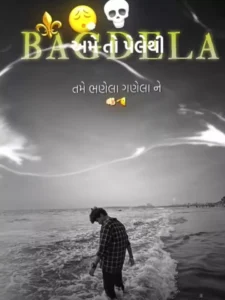
As you can see, the editing in this template is based on the lyrics of a viral Gujarati song. The video begins with a black background featuring various emojis that appear with a flashing effect, followed by a transition effect that introduces your own clip. In this section, you will observe the lyrics editing style, where the song’s lyrics—displayed in Gujarati text—play out across the upper portion of the video. Additionally, a prominent, stylized text element is displayed in a large font size. Furthermore, a black-and-white filter has been applied to the video, and both the flash and shake effects are perfectly synchronized with the beat of the music. If you wish, you can utilize this template to create your own version of this video edit simply by adding a single photograph of your choice.
What kind of clips should you use for this?
Friends, this involves editing a lyrics video with an “attitude” theme. If you have even a little experience with video editing, you likely already know that people nowadays primarily use photo clips to create lyrics videos; therefore, you should use photo clips for this project as well. You can choose to use either aesthetic-style images or attitude-themed images. Feel free to use whatever high-quality images you have available to create this video edit. Your images will be automatically edited to match the style of the template. Let me now provide you with the link to the template and show you how to use it.
How To Use No Fluke Gujarati Capcut template
Friends, in this article, I have provided you with comprehensive information regarding this template. Now, let me clearly explain how you can actually use it. You have two methods available for utilizing this template; you may choose whichever one you prefer or find easiest. One option is to open the CapCut application, navigate to the “Templates” section, search for this specific template by name, locate it, and then proceed to use it. However, you may occasionally encounter an issue where you are unable to properly find the exact template you are looking for—simply because there are already so many other templates available within the app. There is a simple solution for this as well, which I will explain to you step-by-step.
- First, click on the “Check Template” button that we provide within this article.
- Template will automatically open the template directly within the CapCut application.
- You will see a preview video of the template displayed on the screen; below it, you will find an option to “Use” the template.
- Click on that option, and then add your video clips—ensure you add the exact number of clips required by the template.
- Once done, click “Next” and wait for a few moments.
- The template will automatically handle the video editing process for you, and you can save your video.
Conclusion
Friends, you can easily create this viral Gujarati lyrics video using a template. With the help of this template, you can quickly produce an “attitude-style” lyrics video—a format that is currently trending—and potentially make your own video go viral through such editing. Please be sure to share your feedback with us on how you liked this, so that we can continue sharing more unique video ideas like this with you. We hope you enjoyed this article.