Trending Nokia Filter Effect – Friends, a new trend involving filters is currently sweeping across social media. If you are active on Instagram, you are likely already aware that people are now using various filters to transform their ordinary photos and videos into something captivating. One such highly viral trend revolves around the “Flash Filter”—a brand-new addition to Instagram’s filter library. While people were already busy editing their images using this tool, yet another new filter trend has emerged, allowing you to transform a standard video clip into a professionally edited masterpiece. With the help of this filter, your ordinary video takes on a distinct “nighttime” aesthetic, applying an effect that simulates the look of flashing lightning. So, friends, if you too wish to create your own videos using this filter, simply follow the steps outlined in this article.
Details Of Trending Nokia Filter Effect
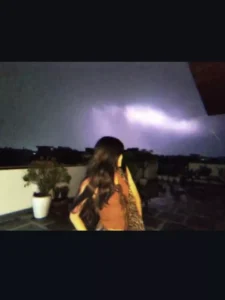
Friends, let me first tell you about this filter. Let me explain what appears in the videos that are currently going viral using this filter. It features a video clip in which the subject looks backward, then turns to face the camera—appearing joyful—while seemingly feeling the breeze. In the background, the sky is visible, featuring a scene of flashing lightning that creates the impression that it is either evening or nighttime. However, this effect is achieved by applying this specific filter to an otherwise ordinary video. When you use this filter, these effects will be applied to your footage, making your video look as though it were shot on an older mobile phone with lower resolution or pixel quality.
How To Use This Filter
So friends, here is how you can use this filter to create your own videos: you will need an application called “Kapi Cam.” You can find it on the Play Store. Once you have it, open the app; you will see a “Filters” option—go ahead and click on it. Now, we need to select that specific viral filter; look through the list of filters, and you will spot one named “Nokia”—click on that. After that, you can either shoot a new video or upload an existing one. If you already have a video saved on your device, simply upload it, and this filter will be automatically applied to your video.
Why This Filter Is Trending
Friends, videos featuring this specific filter are becoming incredibly popular on Instagram and other social media platforms. This is because the filter gives ordinary videos an attractive makeover, transforming them into aesthetically pleasing content. Additionally, the filter incorporates “night effects” that evoke a sense of nostalgia—reminiscent of the old days when people used to shoot videos under low-light conditions. Consequently, even in today’s modern era, people are using this type of filter to relive and cherish their memories. Furthermore, by following this trend, people are actively creating edits using this filter. If you, too, wish to give your videos that “Nokia filter” style, you can utilize this filter—it is completely free!
Conclusion
I hope you really like this “Nokia Copy” filter and that you have understood how to apply it to your clips. I have explained the entire process to you; simply follow the steps to use the filter. If you wish to learn more unique and trending video or photo editing techniques like this, please visit this website. You will discover a wide range of new editing skills to master.