Trending Couple Ai Video Editing – Friends, AI videos are going viral on social media these days, and people are creating and sharing videos using AI in various ways. These videos can be created very easily using AI. Similarly, today I’ll teach you how to edit a viral AI video that’s currently going viral and has been created in a very funny way. It’s a video of an AI couple. We can easily edit this video on our phones in just a few minutes. I’ll explain the process in this article. Read the article and complete your editing.
Details Of Trending Couple Ai Video Editing
So friends, we are going to easily create this video using AI. In it, you will see a scene where a video plays showing a young man setting up the camera; he moves to the back and stands sideways, as if waiting for someone to arrive. Then, a gust of wind blows, and a woman appears, walking towards him. The video shifts to slow motion as the woman—dressed in an Indian saree—approaches the man; they come close to each other, creating a romantic atmosphere. Notably, the woman in this video isn’t a real person but was created using AI, yet the video looks incredibly realistic—just like footage of a real couple. You can easily create this yourself with the help of AI.
Editing Process Of This Ai Video
Look, to do this AI video editing, we will need an AI tool. We can do it using any AI tool like Flow Ai or Grok or any other AI tool, you can use whichever one suits you and we will use Flow AI to do this editing. To create this AI couple video, you first need to record a video of yourself. For instance, as shown in the video where a young man sets up the camera and then turns to the side, you should record a similar clip to use at the beginning. Next, take a screenshot of the final part of that video. You will then use that screenshot along with a specific video prompt—available on the website—to generate the AI couple video. I will explain the actual creation process in the next paragraph.

Video Prompt –
Create an ultra-realistic cinematic romantic video using the two uploaded reference photos. Preserve both people’s facial identity, hairstyle, skin tone, body proportions, and overall appearance accurately. Do not change their faces or make them look like different people.

Scene: A beautiful Indian outdoor setting during golden-hour sunset. The girl is standing slightly in front, wearing an elegant traditional saree with a flowing pallu/dupatta. The boy is positioned naturally just behind her pallu, partially visible through the flowing fabric, creating a dreamy romantic composition.

Motion: The girl’s pallu gently moves in the wind in elegant slow motion. The boy slowly steps into view from behind the pallu and looks toward her with a subtle romantic expression. She gently turns her head toward him. Their movements should be natural, graceful and realistic.

Camera: cinematic slow-motion, 60fps look, subtle handheld camera movement, slow camera push-in, shallow depth of field, smooth parallax, soft background bokeh, realistic motion blur and natural fabric movement.

Lighting: warm golden-hour sunlight, soft rim light around their hair and saree, cinematic highlights, natural skin tones, realistic shadows, subtle lens flare.

Style: premium Indian romantic music-video aesthetic, ultra-realistic smartphone/cinema camera quality, detailed skin texture, realistic cloth physics, natural expressions, smooth continuous movement, cinematic color grading.

Important: Keep both identities exactly consistent with the uploaded photos. No face morphing, no face distortion, no extra people, no unnatural body movement, no sudden camera cuts, no exaggerated expressions, no cartoon or AI-looking appearance.

Duration: 5–8 seconds, vertical 9:16, highly cinematic and realistic.
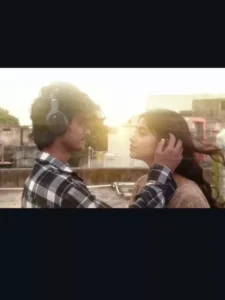
Image Prompt –
"Edit only this uploaded image. Do not change the person's face, hairstyle, body, skin tone, clothes, headphones, pose, hand position, camera angle, background, lighting, shadows, or image quality. Preserve everything exactly as it is.
Add a realistic, slim, cute Indian girl standing naturally in front of the person's raised hand so it looks like he is gently touching her cheek and tucking her hair behind her ear. The girl's face should be turned slightly toward him with a soft, romantic expression. She should have long black hair, delicate features, minimal natural makeup, and wear an elegant Indian saree in a soft dusty rose (blush pink) tone with subtle jewelry (small earrings and a thin necklace).
Blend the girl perfectly into the existing scene with matching perspective, scale, lighting, shadows, color grading, and depth of field. Make it look like both people were photographed together in the same moment. Keep a small natural distance between them while maintaining the illusion that his hand is resting on her cheek and brushing her hair.
Do not crop, zoom, replace, redraw, beautify, or modify the original person in any way. The only change should be adding the girl realistically into the scene."
Video Prompt –
Create a slow-motion cinematic romantic shot. Keep the camera COMPLETELY LOCKED. No zoom, no pan, no tilt, no rotation, no camera shake, no reframing, and no scene changes. Preserve the room, walls, window, curtain, lighting direction, composition, and perspective exactly as they are.
Maintain perfect facial identity consistency. Do NOT change the boy's face, the girl's face, hairstyle, skin tone, body proportions, clothing, headphones, jewelry, or accessories. Keep both characters exactly identical to the original image.
The entire animation plays in elegant slow motion.
The boy looks deeply at the girl with a soft, loving expression. His hand moves very slowly and naturally, gently brushing a few loose strands of her hair behind her ear. His fingertips softly glide through her hair with delicate, realistic motion. Every movement feels calm, intimate, and emotionally genuine.
The girl remains mostly still. She slowly blinks once, gently breathes, and slightly tilts her head into his touch. Her hair naturally follows the movement of his fingers. A very soft indoor breeze lightly moves a few loose strands of her hair and the boy's hair.
Keep the existing indoor lighting exactly as it appears in the original image. Do not add sunlight, sunset, lens flare, bloom, rim light, or any new light source. Maintain the same room brightness, color temperature, shadows, and natural indoor ambience throughout the entire video.
Keep the rest of the environment almost completely still. Only the hair moves slightly with the breeze. No extra object movement.
The final feeling should be a dreamy, emotional romantic movie scene where love is expressed through subtle eye contact, gentle touch, and natural human movement, while preserving the realistic indoor atmosphere.
Style:
Ultra realistic.
Photorealistic.
Romantic cinematic.
Natural indoor lighting.
Soft realistic shadows.
Natural human movement.
Movie quality.
4K.
60 FPS.
High facial consistency.
Professional cinematic color grading.
Negative Prompt:
camera movement, zoom, pan, tilt, rotation, camera shake, scene change, face change, identity change, hairstyle change, body deformation, clothing change, headphones change, sunlight, sunset, sun flare, lens flare, bloom, rim light, artificial glow, fake light rays, sparkles, particles, magical effects, smoke, unrealistic motion, exaggerated expressions, AI artifacts, flickering, blur, low quality, cartoon style, background changes.
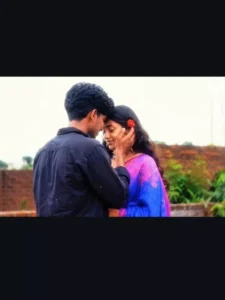
Use the uploaded image as the first
 frame. The man's face is the highest priority
and must remain 100% identical throughout
 the entire video. Never regenerate, replace,
beautify, or alter his face in any frame.
 Preserve his exact identity, facial
features, hairstyle, hairline, skin tone, eyes,
nose, lips, jawline, ears, expression,
side profile, body shape, clothing,
 watch, and the entire background
exactly as in the original image.
 Apply perfect face lock, identity
lock, zero face morphing, zero face
swapping, zero identity drift, and
frame-to-frame facial consistency.
A beautiful 18-year-old girlfriend
 wearing an elegant traditional saree
with fresh white jasmine (gajra) in
 her hair naturally enters from the
exact direction the man is facing
(left or right depending on the
uploaded image), walks toward him,
and stops directly in front of him.
 They make gentle eye contact. The
man slowly raises one hand and softly
 places it on her cheek in a sweet,
 affectionate gesture. She smiles
 naturally and slightly leans into
his hand. Keep the interaction
 respectful, realistic, and emotionally
warm. Cinematic handheld camera, soft
natural daylight, smooth realistic
 motion, shallow depth of field,
ultra-realistic 4K quality, and
 absolutely no changes to the man's
 face in any frame.
How To Generate Your Video
Friends, using Google Flow AI is very easy. If you haven’t learned how yet, I’ll explain it to you step by step in this paragraph. If you follow these steps, you can easily generate a video using your image and the provided prompt.
- First, you need to copy the prompt given on this website.
- Then, click on the “Generate Your Video” button to go to the Google Flow website, and once there, sign in.
- Next, click on “New Project,” then in the dashboard, click on the “Text to Video” option,
- and then on the “Frame to Video” option.
- Add an image, and then paste the copied prompt into the dashboard.
- Finally, click on the “Generate” button and wait a few moments.
- It will then generate the video. The type of video it generates depends on the prompt you enter.
Conclusion
Friends, you can easily do this funny AI video editing with the help of these simple processes. Everything has been explained to you. If you want to make some changes in the video, like adding something else instead of a goat, or whatever you want to change, you can select it in the prompt. The video will be generated as per what you write in the prompt. So you can also change the video by customizing the prompt. I hope you liked this article and you must have liked this editing. For more such trending AI video editing, visit this website.