Trending Couple Ai Video Editing – Friends, AI videos are going viral on social media these days, and people are creating and sharing videos using AI in various ways. These videos can be created very easily using AI. Similarly, today I’ll teach you how to edit a viral AI video that’s currently going viral and has been created in a very funny way. It’s a video of an AI couple. We can easily edit this video on our phones in just a few minutes. I’ll explain the process in this article. Read the article and complete your editing.
Details Of Trending Couple Ai Video Editing
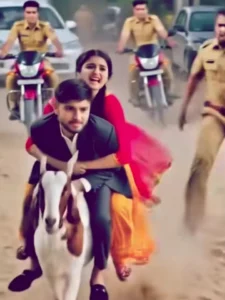
So, before we get into the editing, let’s learn all the details. The editing in this template is quite humorous, created with AI, but it looks absolutely realistic. You’ll see an AI couple fleeing from the police, pursued by a police vehicle. Then, a goat appears, and the couple climbs aboard, escaping the police. They make their escape through the mud, while the police stop and watch. People are laughing at this scene of them fleeing on the goat, and the video is being shared widely, making it viral. So, if you’d like to make this video with your own face, keep reading the article. The process will be explained.
Editing Process Of This Ai Video
Look, to do this AI video editing, we will need an AI tool. We can do it using any AI tool like Flow Eye or Grok or any other AI tool, you can use whichever one suits you and we will use Flow AI to do this editing. So first we have to prepare an image of ours in which our face is visible, we will generate the video from that image. I will give you the prompt of the video below, paste that prompt in Flow AI and add your image and generate it. It is such an easy process, if you want to know step by step then read the next paragraph.
Note: Some CapCut templates may not open in certain regions due to the app’s own restrictions. If the template button doesn’t respond, please try again later or open it directly from the official CapCut app. This external link opens the original CapCut template in a new tab. We are not affiliated with CapCut; all rights belong to their respective owners, and we only provide links for user convenience.
Create an 8-second cinematic funny chase video. Use the uploaded photo of the boy and keep his face realistic and natural. Add an AI-generated girl sitting behind him.
0–2 seconds: The boy is suddenly sitting on a running goat on a dusty village road. The AI girl quickly appears behind him and holds his shoulder. Both look slightly shocked but playful. Natural daylight, realistic shadows, cinematic depth of field.
2–5 seconds: The goat runs fast in a dramatic slow-motion style. Dust particles flying in the air. The girl almost loses balance but holds tightly. Funny expressions on both faces.
5–8 seconds: Two police officers appear running behind them trying to catch them. Light comic background vibe, dramatic chase camera movement from behind, slight camera shake for action effect. Ultra-realistic 4K quality, smooth motion, natural skin tones, cinematic color grading, humorous Bollywood-style scene.
How To Generate Your Video
Friends, using Google Flow AI is very easy. If you haven’t learned how yet, I’ll explain it to you step by step in this paragraph. If you follow these steps, you can easily generate a video using your image and the provided prompt.
- First, you need to copy the prompt given on this website.
- Then, click on the “Generate Your Video” button to go to the Google Flow website, and once there, sign in.
- Next, click on “New Project,” then in the dashboard, click on the “Text to Video” option,
- and then on the “Frame to Video” option.
- Add an image, and then paste the copied prompt into the dashboard.
- Finally, click on the “Generate” button and wait a few moments.
- It will then generate the video. The type of video it generates depends on the prompt you enter.
Conclusion
Friends, you can easily do this funny AI video editing with the help of these simple processes. Everything has been explained to you. If you want to make some changes in the video, like adding something else instead of a goat, or whatever you want to change, you can select it in the prompt. The video will be generated as per what you write in the prompt. So you can also change the video by customizing the prompt. I hope you liked this article and you must have liked this editing. For more such trending AI video editing, visit this website.