Nagpuri Shayari Ai Video Editing – Friends, a new style of video editing is currently going viral on social media; created using AI, these videos feature a highly realistic look. They show people reciting Nagpuri-style poetry on a stage, creating the impression of a live performance. The editing is both creative and incredibly realistic. The best part is that you can easily create this kind of video yourself using AI—and completely for free. If you want to create this viral Nagpuri poetry video, simply follow this article. Today, I will guide you through every step of the process, allowing you to complete the editing in just two steps: first, generating an AI image, and then creating a video from that image. So, let’s dive into the article, and I’ll walk you through the step-by-step process.
Details Of Nagpuri Shayari Ai Video Editing
A viral video is currently gaining massive attention on social media. In the clip, a model appears on stage holding a microphone and reciting a beautiful romantic shayari in the Nagpuri language. The video looks incredibly realistic, making viewers believe that a real person is performing the poetry live on stage. What makes this video stand out is the use of AI technology to superimpose a face onto the model, creating a highly authentic and engaging visual experience.
Combined with the emotional appeal of the shayari, this realistic effect has helped the video attract millions of views and shares online. The good news is that you can create a similar AI-generated viral video yourself. The process is simple: first, generate a high-quality image, then turn that image into a video using AI tools. In the following sections, we’ll walk you through the complete step-by-step process so you can create your own realistic and engaging video with ease.
How To create This Video Edit?
Friends, the process for creating this Nagpuri shayari (poetry) video is very simple; you can do it in just two steps. First, you need to create an image using AI. Copy the image prompt provided in this article, open the ChatGPT app, paste the prompt, and add a reference image. Click the plus icon to add your image, then hit the generate button and wait a few moments; your AI-generated image—showing you standing on stage holding a microphone—will be ready. Save this photo. Next, to generate a video from this image, open the Flaw AI website, start a new project, and add the AI image using the plus icon. You will also need to enter a shayari prompt—I will explain how to create that prompt later. Once you generate it, your Nagpuri shayari video will be ready.
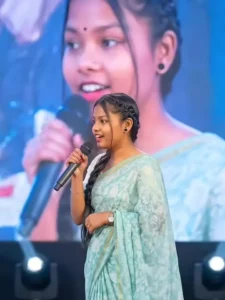
Use the provided image as reference and keep the person exactly unchanged — same face, hair, skin tone, expression, pose, body proportions, gaze, and full outfit with all details intact. Place the person at the center of a grand live concert stage, holding a premium microphone while performing or addressing the audience. Behind them, a huge LED screen shows a softly blurred close-up of the same person. Add cinematic spotlights, volumetric beams, light haze, vibrant stage lighting, realistic crowd ambiance, bokeh, shallow depth of field, and natural shadows. Ultra-realistic DSLR shot, 85mm lens, sharp facial focus, detailed skin texture, natural colors, 4K, vertical 9:16, professional concert photography style.
How To Create Shayari In Chatgpt?
Friends, to create a shayari (poem) using ChatGPT, simply open the app and go back to the chat where you previously generated the image. Then, ask it to write a Nagpuri shayari for that image. ChatGPT will generate the shayari for you; copy it and add it along with your photo on the AI website, and it will create a viral AI video featuring your shayari. This entire process is completely free.
Conclusion
So friends, I hope you have now fully understood the tutorial for creating those viral Nagpuri shayari videos. You can now easily create your own creative shayari videos featuring your own face and a stylish, impressive look. The entire process is completely free and simple; by following this article, you will learn the whole method, and I am sure you will love it. Do keep visiting our website to learn more unique and creative editing techniques, as we will continue to teach you how to create the latest trending videos.