Mahadev Hand Trending Video Editing – Hello friends, you must have seen various types of AI videos on social media these days, which people are creating and sharing using AI, and these videos are going viral. I’m going to teach you how to edit one such video. You can edit this video for Shivratri. You must have seen videos of Lord Shiva walking forward with a trident in one hand and holding our hand in the other, with the ocean in front. Friends, this video looks realistic and unique. People are enjoying watching it. Even before Shivratri arrives, such videos featuring Lord Shiva have started going viral. So, friends, I’ll walk you through the entire editing process in this article. If you read it, you won’t have any problems and will be able to create your own videos.
Breakdown Of Mahadev Hand Trending Video Editing
Let’s break down this AI video editing to see how it’s done. As I mentioned, this is an AI video of Lord Shiva. In which you’ll see Lord Shiva in his Rudra. form walking forward, holding our hands. Then, the clip changes, showing us from the front, holding our hands. This editing was specifically created for Shivratri, and it’s not necessary that you can create this video only with Lord Shiva. You can create videos with any God you want, but you’ll need to customize the prompt. Friends, we’ll use one of our photos to do this editing, and it’ll take two steps. First, we’ll generate our photos, and then we’ll create a video using those photos.
How To Create Images First
To do this editing, first you have to generate an image. I am giving you the image prompt in this article. First copy the image prompt, then click on the create image button and come to the Chatgpt website. If you want, you can also use Gemini, you will get the same result in both. So you have to go to gpt and paste the prompt and generate the image of Lord Shiva with two hands. Then again, now you have to paste the second image prompt in Chatgpt. And add one of your images with the plus icon and then generate your AI image. In this way, you can generate both the images. After that, I will tell you the process of generating the video in the next paragraph.
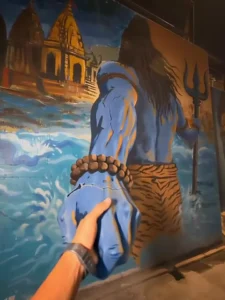
Image Prompt:-
Use uploaded photo for exact face & outfit (no changes). Ultra-realistic DSLR night shot, vertical 9:16, full body. Subject small, bottom-left, side/back profile, camera slightly behind, looking up. Huge Lord Shiva mural on old wall (back view, long hair, trishul), painted style but realistic. COLOR & LIGHTING (MOST IMPORTANT): Warm orange sodium streetlights casting golden highlights. Deep blue & teal shadows on wall and skin. Muted cinematic tones (no bright colors). Wet ground reflecting orange light. Soft glow from streetlight (top corner). Dark moody contrast, slightly desaturated. Natural haze + low-light grain. Skin and wall catching warm highlights + cool shadows balance. 3D Shiva hand emerging from wall, same blue tone, realistic shadows. No touch, small gap between hands (spiritual feel). Old Indian alley, dark, cinematic, realistic textures. No glow effects, no fantasy, no CGI — pure real photo look. 8K, ultra-detailed, cinematic, realistic.
Video prompt
LOCK ORIGINAL IMAGE: face, outfit, pose, mural, lighting, perspective, framing unchanged. Shiva mural fully static. Only blue-grey hand emerges slowly from wall (3D illusion), minor wrist cracks, light dust fall. Camera: slow forward handheld, very subtle, no shake. Subject still, looking up, natural breathing, slight cloth movement. Raises hand slowly as Shiva hand extends → gap closes. HAND: fingertips touch → visible → Shiva hand gently wraps. Perfect anatomy (5 fingers, correct wrist, no distortion). Emotion: calm, divine, protective. No force, no fast motion. Final: hands fully connected, hold 2s. Env: dark Indian alley, warm streetlights, wet ground, haze, cinematic shadows, muted tones. Style: ultra photorealistic DSLR, real physics, DOF, motion blur, realistic textures. NO: animation, glow, powers, movement in mural, face/outfit change, artifacts, extra fingers. 8s, 9:16
How To Generate Your Video
Friends, you have to generate both the images first using Chat GPT and then you have to make a video, so I will tell you the process for that as well. Look, you will see a video prompt above, copy that prompt, then click on the Generate Your Video button. And you will reach the Flow AI website. Now here you have to click on the New Project button and then click on the Text to Video option and select the Frame to Video option. Now you have to paste the prompt and then add those two images which you just generated using the Upload button. Now after adding the images, you have to click on the Generate button and wait for a few moments until the video is generated. Then the system will create your video and make it ready, you can save it.
Conclusion
So friends, by following this process, you can create your own video in which you will be seen holding the hand of Lord Shiva. And these videos are going viral on social media these days, so the chances of your video going viral will increase. And if you want such new trending video editing tutorials so that you can easily edit your videos, then you can develop on this website. You will find new trending articles here and you can easily learn your video editing. I hope you have understood whatever I have taught you.