Couple On Tower Ai Video Editing – Friends, there is a trending AI video editing style on social media where people are creating AI videos featuring couples. In these videos, a couple is seen atop a tall tower, both dressed in black, holding a black flag that displays your name. Creating this viral AI video is actually quite simple; you can make one featuring yourself and your girlfriend, both dressed in black, with a black flag bearing your name. I will explain the entire process in this article; if you follow the steps outlined here, you will learn exactly how to do it and can easily create your own AI couple video.
About This Couple On Tower Ai Video Editing
Have you ever seen those viral AI videos where a couple is standing on top of a massive network tower, making it look like it was filmed by a drone? In this video, both people are dressed in black outfits with black masks, facing each other while holding onto the tower’s structure. A large black flag waves in the air, and you can easily customize the text on the flag with your own name, brand name, or logo. The best part is that you don’t need drone footage or complicated video editing skills. This entire AI video can be created using just a single image. In this tutorial, I’ll show you the complete process step by step in just two simple stages, making it easy for anyone to recreate this trending AI effect.
Editing Process Of This Video
In this article, I will explain how you can create this AI-generated video. The process is very simple. First, we need to create an AI image, and then we will transform that image into a video. To create the image, start by copying the prompt provided in this article, then open the ChatGPT app. Paste the copied prompt, add a reference image, and hit generate. Your viral AI image will be ready in just a few moments; I will explain the process of converting this image into a video in the next paragraph.
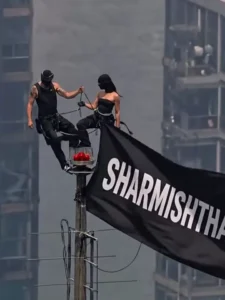
Image Prompt –
Create an ultra-realistic vertical 9:16 cinematic drone shot of two young Indian adults standing on the tiny top platform of a very tall communication tower above a huge modern city skyline. The city below is blurred with atmospheric haze, giving an extreme height and vertigo feeling.A young man with curly black hair and short beard is wearing an all-black outfit, standing confidently with one foot raised and one hand holding the antenna pole. Beside him, a youna woman in a black sleeveless outfit stands calmly, also holdir.g the pole. A large black flag is attached to the tower and blowing strongly in the wind.On the flag, write in bold white uppercase text:rajaneditz.COMSE PROMPT LELOAUR HO JAO VIRALKeep the text clearly readable, centered on the flag, slightly following the cloth folds. Realistic lighting, warm daylight, telephoto lens compression, high altitude aerial photography, detailed metal tower, cinematic shadows, documenta. y realism, 8K, HDR, no extra people, no logo, no watermark
Video Prompt –
animate this photo as the flag is weaving in slow wind. Keep the rest still and add a little zoom in motionAspect Ratio 9:16
How To Generate This Video
If you want to create realistic AI videos like this, the process is surprisingly simple. Start by clicking the Generate Video button to open the Flow AI website. Sign in with your email address, then click Create Project to begin a new project. Once you’re on the dashboard, select the Text option, then choose Frame to Video. After that, click the + icon to upload your image. Copy the prompt provided on my website and paste it into the prompt box. Finally, click the Generate button and let Flow AI do the work. Within a few moments, your AI-generated video will be ready with a realistic, cinematic look. That’s it! With just a single image and the right prompt, you can create stunning AI videos in only a few clicks.
Conclusion
Friends, this is how you can easily create this viral “couple with the tower” video. This video was generated using AI and has no connection to real life; you can create it just for fun. I hope you have understood the editing process and can now easily make the video yourself. If you want to create similar AI-generated photos or videos, feel free to visit our website, where we will teach you new and innovative editing techniques.