Cinematic Ai Photo Editing Prompts – Currently, a new trend has emerged on social media where everyone is creating aesthetic images. These photos are being generated with the help of AI, utilizing a collage-style format with a musical theme; this trend has completely flooded social media, and everyone is eager to replicate this editing style. Friends, if you would like to create such images for yourself, you can easily do so on your own using AI. The images you generate will look completely realistic—mirroring the exact style of the viral trend. In this article, I will teach you how to perform this editing. If you follow the article closely, you will find various precise prompts for generating aesthetic images, enabling you to execute this editing process with ease.
Details of Cinematic Ai Photo Editing Prompts
Take a look—this style of photo editing has become incredibly popular; whether male or female, everyone is trying their hand at it. Let me tell you exactly what details you can expect to find in it. First, you will notice that three to four distinct layers compose the final image, featuring smaller versions of your photo captured in various poses. It creates a collage-like effect, wherein each smaller image displays a unique facial expression—in one, you might be smiling, while in another, you might be looking off to the side. Furthermore, the photographer has color-graded the photos to give them a cinematic and retro aesthetic. You will also spot a music symbol displaying the name of a song, creating the impression that you are currently listening to music. Additionally, some floral elements have been incorporated—reminiscent of the decorative touches often found in vintage-style photographs.
How To Create Image With Cinematic Ai Photo Editing Prompts
Friends, you can use any AI tool—such as ChatGPT or Google Gemini—to create this image. Nowadays, people widely use these two tools because they consistently deliver perfect results. So, let me walk you through the process: First, simply copy any of the image prompts provided in this article, and then open either the ChatGPT application or its website. Next, paste the prompt into the interface and add your image by clicking the plus (+) icon. Finally, click the “Generate” button; after waiting just a few moments, your image will be ready. In fact, the result you receive will be even better than what you originally envisioned.
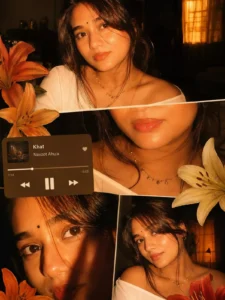
Ultra-realistic cinematic collage of a young woman using the uploaded face exactly.The image is composed of multiple rectangular photo panels layered vertically and diagonally, creating a scrapbook-style layout. Each panel shows close-up and mid-shot portraits of the same girl in a dim indoor room.Lighting: strong, warm, golden-orange direct flash lighting hitting the face from the front-left, creating high contrast, deep shadows, and a glowing skin effect.Background remains dark with visible window curtains slightly illuminated. Harsh highlights on cheekbones, nose, and lips.Slight film grain and soft blur for a dreamy vintage feel. Color grading: intense amber, burnt orange, and golden tones dominating the entire image.High saturation, slightly crushed blacks, and glowing highlights.Subject styling: messy tied-back hair with loose strands falling on face, glossy lips, subtle eyeliner, dewy skin. Wearing a delicate necklace with small pendants and a casual off-shoulder white top.Composition details:Top panel: serious expression, looking directly at camera.Middle panel: cropped lips and necklace close-up.Bottom left: extreme close-up of eyes with strong shadow split across face.Bottom right: angled portrait with soft side gaze.Panels overlap slightly with uneven spacing for aesthetic collage look.Overlay elements:Add realistic flower stickers (lilies in orange, cream, and red tones) placed around the collage.Add a music player Ul card in the center-left area with a soft rounded design.Music player text:Title: "salvatore"Artist: "Lana del rey"Include minimal playback bar and icons (play/pause, skip).Final touches:Slight glow/bloom effect on highlightsSubtle vignette around edgesFlash photography look, like taken on a digital camera at nightMaintain natural skin texture, avoid over-smoothing
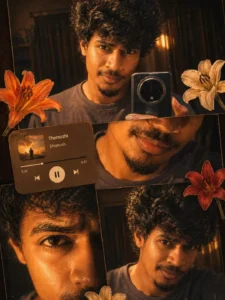
Ultra-realistic cinematic collage of a young Man using the uploaded face exactly. The image is composed of multiple rectangular photo panels layered vertically and diagonally, creating a scrapbook-style layout. Each panel shows close-up and mid-shot portraits of the same girl in a dim indoor room. Lighting: strong, warm, golden-orange direct flash lighting hitting the face from the front-left, creating high contrast, deep shadows, and a glowing skin effect. Background remains dark with visible window curtains slightly illuminated. Harsh highlights on cheekbones, nose, and lips. Slight film grain and soft blur for a dreamy vintage feel. Color grading: intense amber, burnt orange, and golden emozhi tones dominating the entire image. High saturation, slightly crushed blacks, and glowing highlights. Subject styling: messy back hair, glossy lips, dewy skin. Wearing a casual tee. Composition details: Top panel: serious expression, looking directly at 11 camera. Middle panel: cropped lips and necklace close-up. Bottom left: extreme close-up of eyes with strong shadow split across face. Bottom right: angled portrait with soft side gaze. Panels overlap slightly with uneven spacing for aesthetic collage look. Overlay elements: Add realistic flower stickers (lilies in orange, cream, and red tones) placed around the collage. Add a music player Ul card in the center-left area with a soft rounded design. Music player text: Title: "Themozhi" Artist: "Dhanush" Include minimal playback bar and icons (play/pause, skip). Final touches: Slight glow/bloom effect on highlights Subtle vignette around edges Flash photography look, like taken on a digital camera at night Maintain natural skin texture, avoid over-smoothing
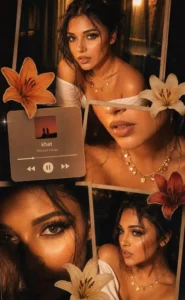
Warm-toned cinematic portrait collage of a young woman with soft glowing skin, subtle freckles, and glossy nude lips. She has long dark brown hair styled in loose waves with face-framing strands. She is wearing traditional gold jhumka earrings and a delicate necklace, dressed in a deep magenda outfit with a sheer dupatta around the neck. The lighting is golden-hour inspired with rich amber highlights and soft shadows, creating a cozy, intimate mood.The composition is a collage layout with multiple cropped frames of her face—close-ups of eyes, lips, and side profile-arranged aesthetically. Add soft floral elements like beige and orange lilies placed around the frame. Include a blurred music player overlay showing a song playing for a nostalgic vibe. Skin appears dewy and radiant, with minimal elegant makeup.
Why This Photo Editing Is So Viral?
Friends, this style of photo editing is currently trending massively on social media, and there is a fierce rush among people to recreate it. This is because the vintage and cinematic detailing incorporated into it is so exquisite that the resulting image doesn’t even look like it was generated by AI; instead, it resembles a movie poster or a creation by a professional editor. Thanks to its realistic appearance and collage-style aesthetic, it is gaining immense popularity among users. Moreover, courtesy of AI technology, anyone can now easily achieve this aesthetic, cinematic photo-editing style with the simple help of a prompt.
Conclusion
So, that is how you can create this viral aesthetic photo edit. You should definitely give this editing style a try, as everyone’s images are going viral with this trend. I have also outlined the entire process for you; by following it, you can easily generate your own images for free. I hope you really enjoy this! If you wish to learn more trending editing techniques like this, be sure to visit this website.