Usne Mujhe Chhod Diya Capcut Template – Friends, in this article, I’m giving you the link to another new template. You must have seen and heard about it, as it’s going viral. People are using this template to edit their videos in just one click, and this editing style is trending. If you also want to edit your videos, you can use this template. It will edit your video in a single click. You just need to know how to use it. If you already know, you can use it. Otherwise, read this article; I will explain the entire process in a simple way, which will help you with your video editing.
Details Of Usne Mujhe Chhod Diya Capcut Template
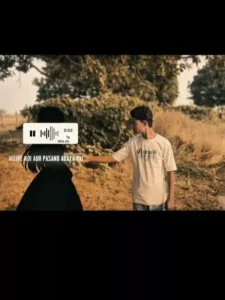
Friends, let’s talk about this template. It’s based on a sad song and features sad editing, and it’s currently going viral. Instead of normal editing, some creative elements have been added, which is why people are liking it. At the beginning of the video, our video plays, and then a shadow appears, which is of a girl. She tells us “breakup” and then disappears. We become disappointed and lower our heads, lost in the past, and a flashback video starts playing in the background, showing moments spent with our partner. This type of video is quite popular. Regarding the editing, there isn’t much editing involved; otherwise, the video wouldn’t look realistic. It uses normal editing techniques like glow effects, flash effects, and beat syncing. So, if you also want to create a sad video with a flashback video playing in the background, you can use this template. It will automatically do all the editing for you. Let me tell you what kind of videos you should add to it.
Best Way To Record Clips For This Editing
This is a sad video editing tutorial, so we’ll be using these specific video clips. Let me show you how to prepare the video clips. First, set up your camera – whether it’s a DSLR or a phone – on a tripod or a stable surface so there’s no camera movement. Then, record a video in landscape mode. Start recording while you’re in a sad mood. At the beginning of the video, look to the side as if your girlfriend is standing there and talking to you. You reach out to touch her, but she suddenly disappears. You then lower your hands in disappointment and bow your head. That’s all you need to record. Your video will then look exactly like the viral video. Choose a location with greenery for the video a park or any place attractive background.
Note: Some CapCut templates may not open in certain regions due to the app’s own restrictions. If the template button doesn’t respond, please try again later or open it directly from the official CapCut app. This external link opens the original CapCut template in a new tab. We are not affiliated with CapCut; all rights belong to their respective owners, and we only provide links for user convenience.
How To Use Usne Mujhe Chhod Diya Capcut Template
To perform this editing, you’ve received the template link, but you don’t know how to use this CapCut template. So, in this paragraph, I’m explaining it to you step by step in a very easy way. If you read and follow these steps, your editing will be complete. It’s a very simple process. Let’s find out.
- First, you need to click on the “Check Template” button below the image and open it in CapCut.
- If you don’t have CapCut, this template link won’t work.
- For this, first install the latest official version of CapCut on your phone.
- Then you can open the template directly in CapCut.
- Here you will see a preview video of this template, and below it, you will see a “Use” option.
- Click on it, and you will go to your phone’s gallery. Here you need to add your clips.
- Add as many clips as needed. Then click on the “Next” button and wait for a few moments.
- If the template has slow motion, wait until it’s complete.
- Now your edited video is ready. You can save it if you want.
- To do this, click on the “Export” button in the upper corner and save your video from there.
- You can also customize the video quality according to your preference.
- This way, your trending video will be ready.
Conclusion
So friends, your video will be edited using this template if you follow all the steps. And I keep sharing links to new templates on this website; you can check them out. The information I’ve provided in this article is sufficient, and I hope you liked it. You can give us your feedback by leaving a comment.