Trending DP Ai Photo Editing Prompt – Friends, if you want your profile picture to be attractive, then today I will tell you a tutorial of DP photo editing, after reading which you can easily make your DP in a professional and attractive look. Many people want that the photo in their DP should be attractive and unique to look at, but making the desired DP is not everyone’s cup of tea because editing takes a lot of time. But now in the age of AI, we can make creative photos in a jiffy, and now with AI you can make any image you want and today we will make unique images in different styles for our DP, which will be made with the help of AI, in this we will not need editing skills, so friends, read the steps given in the article and make your DP editing in a creative way.
Details Of Trending DP Ai Photo Editing Prompt
First of all let us do the breakdown of this editing. So friends, as I told you that now you can create your DP in different styles with the help of AI and the photo will look absolutely realistic. The special thing is that you do not have to create it, you have to generate it, that is, you can create the image with the help of a prompt. And in this article I have given you some DP images and their prompts, in which in some images your name is written along with your face, in some your name is written along with your photo in the background. All these images will create DP images in different styles, which you can directly use in your DP anywhere like in the profile picture of social media like YouTube, Instagram, Facebook, WhatsApp etc. And we will create these with the help of an AI tool, so let me now explain the process in the next paragraphs.
Editing Process For Dp Editing
Look, in the past, people used to spend hours manually editing a single image using various apps. But since the advent of AI photo editing, we can now create unique and professional-level edits in just a few minutes using just one AI application or website. For this dp editing, we can easily and for free use two main AI tools. You’ve probably used both of these. You can use either Chatgpt or Google Gemini, and both will yield similar results. So, friends, I’ll show you the editing process using Gemini. As Gemini is the most widely used today and provides realistic results. Below are the images and their prompts. Copy the one you like and read the paragraph on how to use it.
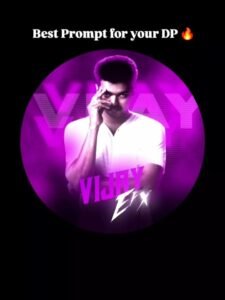
"A circular profile picture design featuring Indian young boy. He is wearing a crisp white button-down shirt and looking intensely at the camera with a serious expression, his right hand raised with fingers touching his temple. The image has a strong monochromatic purple and neon magenta aesthetic. The background features large, translucent block text reading 'Sagar' and a horizontal CRT scanline texture overlay. At the bottom, there is sharp, stylized white text that reads 'Sagar FX'. High contrast, digital fan art style, glowing neon lighting."
Note: Some CapCut templates may not open in certain regions due to the app’s own restrictions. If the template button doesn’t respond, please try again later or open it directly from the official CapCut app. This external link opens the original CapCut template in a new tab. We are not affiliated with CapCut; all rights belong to their respective owners, and we only provide links for user convenience.
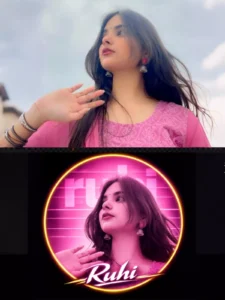
"A circular profile picture design featuring use given image. The image has a strong monochromatic green and neon magenta aesthetic. The background features large, translucent block text reading 'neha' and a horizontal CRT scanline texture overlay. At the bottom, there is sharp, stylized white text that reads 'neha'. High contrast, digital fan art style, glowing neon lighting."
How To Create Image With Prompts
Wait, you’ve liked the form. Now, let me tell you how to use it. First, you need to copy the prompt. Then, click the “Create Your Image” button. Clicking this button will take you to Gemini’s official website. Paste the copied image there. Then, click the “plus” icon below and add one of your own images so that you can match your face exactly to your image. Then, click the “Generate” button and wait a few moments. Gemini will begin creating your DP. In a few moments, you’ll see a stunning result: your face and an image with your name written on it. This image will be created for you in the same style you copied the prompt.
Conclusion
So friends, this way you can easily edit your standing DP photo using a prompt. It will take very little time, and your creative and professional DP will be ready. You can use it anywhere for your social media profile. You just need to follow the method I’ve described to create your image. It’s a very easy and genuine method. If you need any of these new and trending AI photo editing, video editing, or capcut templates, you can visit this website and check them out. Here you’ll find editing options for whatever is trending on social media, and you can easily use them to edit your own.