Helicopter Entry Ai Video Editing – Hello friends! In this article today, I am going to teach you how to create a viral AI video edit. You have surely come across this style of editing before. Although it is generated using AI, it looks incredibly realistic. The exciting part, friends, is that you can now create these AI videos for yourself as well; you won’t need to perform any complex editing manually. You can easily generate your own video with the help of just a simple prompt. So, if you want to try your hand at this editing style, read through this article and create your own personalized video using your own face. I will walk you through the entire process in a very simple and easy-to-understand manner.
Details Of Helicopter Entry Ai Video Editing
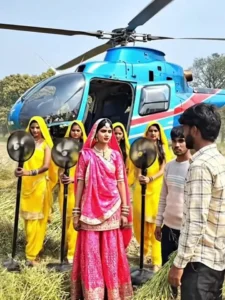
In this editing tutorial, we will observe a scene featuring two boys in a field who are harvesting a mustard crop. Suddenly, a helicopter appears out of nowhere and lands right next to them. A beautiful young woman, accompanied by a few other girls, steps out of the aircraft; she then approaches the two boys and appears to engage them in conversation. Subsequently, they begin operating a pedestal fan, as if to suggest that the weather is extremely hot. So, friends, this is the specific scene we get to witness in this video. Moreover, the scene looks completely realistic. However, we can actually generate this video using an AI tool by simply pasting a prompt based on a reference photograph. I will walk you through the entire process—just keep reading.
What Do We Need for AI Editing?
Look, to generate this video, we will need a photograph. Since we are creating this video using AI, our first requirement is a suitable image that allows us to generate the video in conjunction with a specific prompt. So, friends, to create this video, you will need an image featuring a field. You can either take a photo while standing in a field, or simply snap a picture the next time you happen to visit one, so that you can create this video. However, regardless of the specific image you choose to use, the prompt will ensure that the resulting video looks exactly like the one you saw on Instagram, as the prompt contains all the necessary details. Thus, you can use a photo of yourself harvesting crops in a field to generate your own video.
Note: Some CapCut templates may not open in certain regions due to the app’s own restrictions. If the template button doesn’t respond, please try again later or open it directly from the official CapCut app. This external link opens the original CapCut template in a new tab. We are not affiliated with CapCut; all rights belong to their respective owners, and we only provide links for user convenience.
A cinematic AI video generated from a reference photo of a man. The same man from the photo is standing naturally in his location. Suddenly a helicopter flies into the scene from the sky and slowly lands nearby. The helicopter door opens and a beautiful woman wearing a bright red saree steps out confidently. After her, four more women wearing yellow sarees step out from the helicopter. Each woman is holding a standing electric fan in her hands. They walk toward the man in a friendly and slightly funny style. The woman in the red saree comes closer to the man and says with a smile, “Batao jaan, pankha kahan lagana hai?” The other women stand behind her holding the fans. Cinematic camera movement, realistic environment, natural daylight, smooth motion, humorous vibe, high detail, 4K quality.
How To Generate Your Video
Friends, using Google Flow AI is very easy. If you haven’t learned how yet, I’ll explain it to you step by step in this paragraph. If you follow these steps, you can easily generate a video using your image and the provided prompt.
- First, you need to copy the prompt given on this website.
- Then, click on the “Generate Your Video” button to go to the Google Flow website, and once there, sign in.
- Next, click on “New Project,” then in the dashboard, click on the “Text to Video” option,
- and then on the “Frame to Video” option.
- Add an image, and then paste the copied prompt into the dashboard.
- Finally, click on the “Generate” button and wait a few moments.
- It will then generate the video. The type of video it generates depends on the prompt you enter.
Conclusion
Friends, this is how you can create a “farm-themed” video featuring your AI girlfriend. In this video, you are shown harvesting crops, while your girlfriend arrives in a helicopter to fan you and keep you cool. Friends, this is a very fun and viral video concept—you definitely have to give it a try! Furthermore, if you are interested in creating more trending AI-edited videos like this, you can visit this website to explore your options. Be sure to share this website with your friends so that they, too, can create their own edited videos.