Happy Holi Ai Photo Editing Prompts – Friends, nowadays AI created images are going viral on social media and people are liking them a lot. Now Holi is about to come, so AI edited images of Holi are going viral a lot, so friends, today in this article I am giving you some selected prompts for Holi photo editing, with the help of which you can make an attractive and realistic image of your Holi. Friends, the entire social media is filled with such images and people are making such AI images easily, so if you also want to make such a wonderful Holi image from one of your normal selfies, then follow the article, in this article you will be given some prompts for Holi editing and the process of making them will also be explained.
Details Of Happy Holi Ai Photo Editing Prompts
Look, in this editing, we’re editing Holi. You might have seen people sharing their Holi photos with the help of AI, and now you can too. In this article, I’m giving you different AI photo-making prompts, including prompts for both boys and girls. Using any of these prompts, you can create Holi images. Your image will appear as if you’re playing Holi, or you’re dressed up in Holi attire, taking a photo with gulal in your hands. In some images, you’ll be applying gulal to your partner, and in others, your photo will appear as if you’ve referenced a real image. The Holi vibe, color, and everything else will be added to it. The background and color grading of each photo will be exactly like Holi. Friends, with the help of these different prompts, you can create multiple Holi images.
Editing Process Of Holi Images
Friends, to perform this editing, we’ll need an AI tool to generate the image. To create AI images, you’ll find many AI tools, such as Gemini, Chatgpt, Grok, and others. You can use any of them to create images; these prompts are available in all AI tools. So, I’ll teach you how to create images using Chatgpt. Chatgpt’s image will be completely realistic, and the result will be quite attractive. You can also use Gemini. Gemini will also produce good images. So, friends, below are some images and their prompts. Copy any one, then read the next paragraph. It explains how to use Chatgpt.
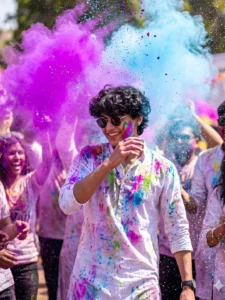
Dynamic action portrait of a young man smiling joyfully, capturing the pure festive energy of Holi. A massive, high-contrast cloud of neon purple and sky-blue powder explodes dramatically in the background and foreground. He wears a crisp white kurta and sunglasses, heavily splattered with colorful pigment. Glistening water droplets and vibrant powder particles are captured frozen mid-air using high-speed photography. Candid, radiant, bright natural sunlight illuminating the dust cloud, ultra-detailed, highly textured.
Note: Some CapCut templates may not open in certain regions due to the app’s own restrictions. If the template button doesn’t respond, please try again later or open it directly from the official CapCut app. This external link opens the original CapCut template in a new tab. We are not affiliated with CapCut; all rights belong to their respective owners, and we only provide links for user convenience.
Add realistic Holi festival color splashes to the existing photo. Keep the original face, pose, background, lighting, camera angle, and composition exactly the same. Apply vibrant gulal powder in pink, yellow, blue, and orange on the face, hair, clothes, boat, and slightly in the air around the subject. Colors should look natural, soft-blended, and photorealistic with fine powder particles and light splatter details. Do not alter facial features, skin tone, body shape, or environment. Maintain original depth of field and overall image quality.
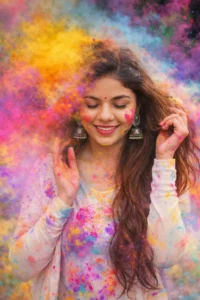
Ultra-realistic 8K DSLR portrait of a young woman celebrating Holi, eyes closed with a joyful smile. Long brown hair flowing, wearing a white top splashed with vibrant colors.
Bright clouds of yellow, pink, purple, blue, and orange powder exploding around her. Soft daylight, high shutter speed capturing flying particles, shallow depth of field, cinematic, ultra-detailed, festive mood.
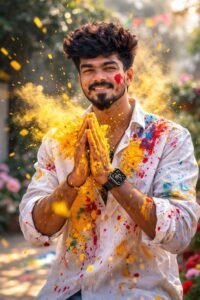
Ultra-realistic Holi festival portrait using my uploaded photo as the face reference, joyful young man smiling naturally, hands pressed together in front of chest covered in bright yellow Holi powder, vibrant yellow color powder exploding and flying across the frame, white button-up shirt splashed with multicolor paint stains (yellow, red, blue), red powder streak on one cheek, playful festive expression, dynamic powder particles frozen mid-air, outdoor garden background softly blurred with green foliage, bright natural daylight, warm tones, cinematic lighting, shallow depth of field, sharp focus on face, ultra-detailed skin texture, high shutter speed capture, 85mm lens, f/1.8, professional DSLR photography, vibrant colors, high contrast, 8K resolution, realistic fabric texture, energetic Holi celebration atmosphere, editorial photography style
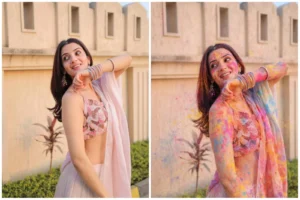
Add realistic Holi festival color splashes to the existing photo. Keep the original face, pose, background, lighting, camera angle, and composition exactly the same. Apply vibrant gulal powder in pink, yellow, blue, and orange on the face, hair, clothes, boat, and slightly in the air around the subject. Colors should look natural, soft-blended, and photorealistic with fine powder particles and light splatter details. Do not alter facial features, skin tone, body shape, or environment. Maintain original depth of field and overall image quality.
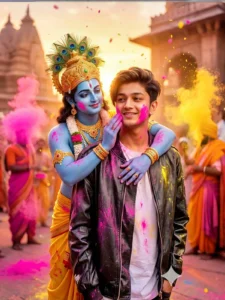
"A hyper-realistic cinematic Holi celebration scene in 8K. Keep my face 100% exactly as in the reference image with original facial structure, smile expression, hairstyle, and skin tone preserved perfectly.
Standing behind me is Lord Krishna in a divine yet realistic form with soft blue skin tone, peacock feather crown, golden jewelry, floral garlands, and flowing yellow dhoti. Lord Krishna is gently hugging me from behind with one hand applying pink gulal to my cheek and the other hand around my shoulder in a blessing-like affectionate gesture.
The background is filled with Holi celebration, flying pink and yellow powder, temple-inspired architecture, warm golden sunset light, cinematic shallow depth of field, soft bokeh lights, floating color particles, ultra-detailed fabric textures, realistic lighting, DSLR 85mm lens, f/1.8, ultra-sharp focus, no fantasy exaggeration, no cartoon, photorealistic divine atmosphere."
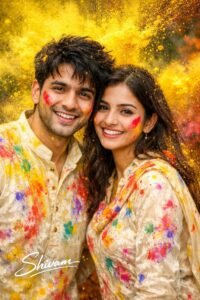
Make an Ultra-realistic Holi festival portrait using my uploaded photo as the face reference, young couple celebration, Holi powder, vibrant yellow color powder exploding and flying across the frame, both wearing white velvet Holi outfit splashed with multicolor paint stains (yellow, red, blue, pink, purple, green), red powder streak on one cheek. playful festive expression. Boy has messy hairs. Use uploaded face.
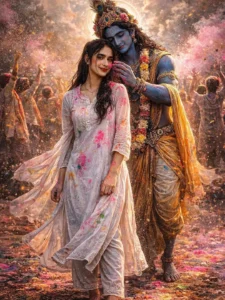
Ultra-realistic 8K cinematic Holi scene, vertical 9:16, full-body head-to-toe. Foreground: beautiful young Indian girl in pure white traditional kurti, flowing fabric, natural skin texture, realistic proportions, no beautification, soft joyful shy expression.
Behind her divine Krishna with deep royal blue skin, glowing blue aura, golden pitambar, peacock feather crown, flower garland, soft halo light. Krishna gently applying dark pink gulal on her cheek with calm divine smile. Massive cinematic no crop full body image keep my face same 100% as in the reference image
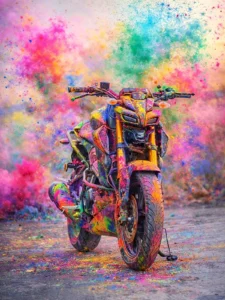
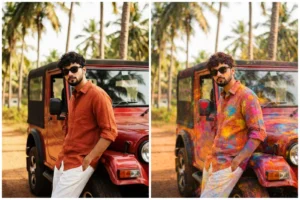
Add multicolour Holi Gulaal on the bike and on the road.& the keep the rest image same
How To Generate Images With Chatgpt
Creating images with ChatGPT is simple and beginner-friendly. Many ready-to-use prompts are available in the article, allowing you to quickly generate your own custom designs. Just copy any prompt and open ChatGPT through the official website or mobile app. You can find the platform easily by searching on Google. Once you’re on the homepage, click on “New Chat” and paste the selected prompt. To generate a photo in the same style, tap the “Plus” icon to upload your reference image. In the Style section, you can explore basic editing options to enhance colors and refine the overall look. Within seconds, ChatGPT will create a realistic Holi-themed image with an updated background and improved visual elements. After processing, your final image will be ready to download and share.
Conclusion
Friends, this way you can create realistic and attractive AI images for your Holi. Creating images with AI has become much easier now. You can create any type of image you want; you just need to be able to write the prompt correctly. If you’re looking for trending prompts, you can visit this website and check them out. You’ll find trending AI photo editing prompts here. We hope you’ll enjoy these Holi editing prompts and create your Holi photo easily.