Hanuman Ji Ai Video Editing – Friends, AI videos like this are becoming increasingly rare, in which we’re lying in bed and, as we sleep, Lord Hanuman comes to us, touches us, and caresses our head. Friends, these videos are going viral, and you can make a similar video yourself, using just a photo. In this article, I’ll teach you how to create your own AI-enabled video. Read this article and create your own video using AI. Let’s learn the rest of the details in the next paragraph.
Details Of Hanuman Ji Ai Video Editing
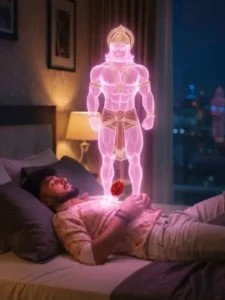
Friends, this is a video made with an AI tool which is very viral. Just some time ago, another video of this was going viral in which an outline AI girl was actually walking with us. But this trend has come again and this time instead of the girl, there will be a video of Hanuman ji. In this, it is shown that we are sleeping with a rose flower in our hand and it seems that we are sleeping remembering the Lord. Then suddenly an AI generated outline video of Hanuman Ji comes to our head and he starts looking at us lovingly while caressing our head and hands. This is the editing done in this video and we are going to make a video of ours in the same way, come let me tell you the complete process.
How To Generate Image
Look, to make a video with Hanuman ji, we will have to create an AI photo and then from that photo we will make a video, so first let us know how we will make the image. First of all you have to copy the prompt given below the image and then click on the Create Your Image button, now we will come to the Google Gemini website, paste the prompt here and add your image with the + icon and click on the send button. After a few moments our AI image will be ready. We will make a video from this image, so you first create the image and then make the video. The process of making the video is explained in the next paragraph.
Note: Some CapCut templates may not open in certain regions due to the app’s own restrictions. If the template button doesn’t respond, please try again later or open it directly from the official CapCut app. This external link opens the original CapCut template in a new tab. We are not affiliated with CapCut; all rights belong to their respective owners, and we only provide links for user convenience.
”A young, dark-haired man with a beard is lying on his back in a modern, dimly lit bedroom, resting on a bed with dark sheets and pillows. He is wearing a patterned shirt and light trousers. A small, vibrant red rose is placed on his chest. Hovering directly above him is a highly detailed, muscular, ethereal pink/magenta holographic figure resembling the Hindu deity Hanuman. The holographic figure is glowing brightly. The room has a bedside lamp and a window showing a blurry city lights view at night. The style should be realistic with strong neon/cyberpunk elements due to the glow of the figure. Cinematic lighting. Vertical shot.”
Keep my face 100% same as in the reference image
How To Generate Your Video
Friends, to create a video from an image, we first need to know how to use it, because we can’t create a video without knowledge. Therefore, I’ll explain all the steps in this paragraph. Follow them, and your video will be easily edited. First, click on the “Create Your Video” button. You’ll be taken to the Flow AI website. The first thing you need to do is log in. You’ll see a “Project” option. Open it.
In the dashboard below, you’ll see “Text” and “Video” options. Click on “Frame” and “Video.” Here, you’ll find various options. From there, select “Frame” and “Video.” Now, select your image using the “+” icon. We’ll create a drone shot. Then, return to the website, copy the prompt, and use it to edit your image on the Flow Labs website. Click on “Generate” and your video will be ready in a few moments. Save it. In this way you can make a video of your Video With Hanuman Ji, it will look absolutely real.
CONCLUSION
In this way, we can create a trending AI video dedicated to devotion. If you are a devotee of Hanuman, you should also make such a video. I hope you have received all the information and are now able to create videos. Please share your feedback on what you felt after reading this article. See you in a new article with a new template.