Girl Car Entry Ai Video Editing – Friends, new AI trending videos are going viral on social media these days. Most people are making funny AI videos, and their videos are becoming very popular. You must have seen that currently, videos of small children, videos of Hanumanji at the gym, or other such AI videos are going viral on social media. Now something new has come up, which you must have seen: a boy is sitting, and then a police car arrives, and the officer shakes hands with the boy. Different people are using their creativity and making such videos. Friends, making these videos is very easy. You can create these videos with the help of a prompt. And today, in this article, I am teaching you how to create such an AI video, with the help of which you can make your own AI video. You must have seen it already. So, let me teach you this editing process and show you how you can create your own AI videos for free.
Details Of Girl Car Entry Ai Video Editing
So, first, let me tell you about this AI video editing. In this video, we see someone sitting by a cooking stove, preparing food. Suddenly, a car drives up, and a girl gets out and sits down in front of us. She starts helping with the cooking. The scene looks very realistic, like a village setting. To create this funny video, we only need one photo of ourselves. We can create it using our photo and a prompt. We’ll use an AI tool called Google Flow AI to create it, and this tool will help us complete the editing.
Why This Type Of Editing Going Viral?
Friends, this type of video editing is going viral for a reason. The main reason for its virality is that it has become incredibly easy to edit and create. Now, anyone can edit their videos with the help of AI. If you imagine something and want to convert it into a video, it’s now possible with AI. You can create an AI-generated video in just a few seconds, and it looks completely realistic. That’s why people are creating videos based on their funny ideas, and because these videos are unique and humorous, they go viral. When others see them, they also want to generate similar videos, leading to a trend of such videos being created by different people.
Update: Friends, in this article, you’ll find different styles of AI video editing. The new trend in AI video editing is shown in the first image, and the prompt is below it. You can try it.
Note: Some CapCut templates may not open in certain regions due to the app’s own restrictions. If the template button doesn’t respond, please try again later or open it directly from the official CapCut app. This external link opens the original CapCut template in a new tab. We are not affiliated with CapCut; all rights belong to their respective owners, and we only provide links for user convenience.
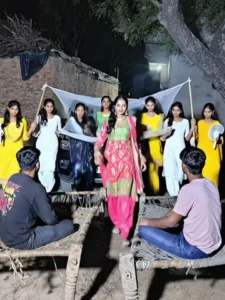
8-second cinematic scene, golden hour lighting. A young man sits alone on a rural bus stop bench, looking thoughtful. Dust rises as a bus full of girls wearing colorful salwar kameez arrives and stops. The door opens. One confident girl in a black coat and pants steps down in slow motion, hair slightly moving in the wind. She walks straight toward him with a serious yet playful expression. Close-up shot as she stops in front of him and says, “Are… tumne hi mujhe lollipop khilaya tha na?” The boy looks shocked and confused. Warm tones, shallow depth of field, realistic, 4K, cinematic camera movement.
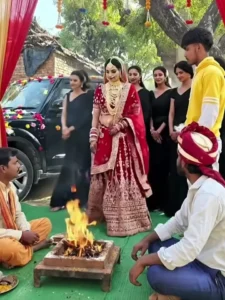
A realistic Indian village wedding ceremony scene, outdoor daytime, green carpet on ground, decorated red and golden canopy with hanging marigold garlands. A sacred havan fire burning in the center.
A young Indian man wearing simple traditional kurta sits cross-legged near the havan kund.
A decorated black SUV car stops behind. The car door slowly opens.
A beautiful Indian bride wearing red bridal lehenga with heavy gold jewelry steps out of the car gracefully. Her friends dressed in matching black sarees step out behind her.
The bride walks slowly toward the havan fire with calm expression, soft smile, natural movement of dupatta in breeze.
She sits down beside the groom near the fire.
Everyone looks respectful and peaceful.
Cinematic camera movement, slow dolly in, warm sunlight, realistic fire movement, soft depth of field, natural skin tones, high detail, 4K, smooth motion.
Other Prompt:-
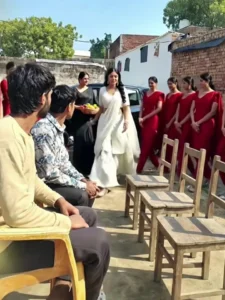
8-second ultra-realistic cinematic comedy video, 4K, film look, STRICT REFERENCE IMAGE REQUIRED, HARD FACE LOCK ENABLED, use the exact uploaded reference face without modification.
Do NOT change, enhance, beautify, age, stylize, blur, partially hide, or replace the face.
Maintain exact facial structure, skin tone, beard pattern, hairline, expression baseline from reference image.
CAMERA RULE (IMPORTANT):
Front-facing 45-degree angle medium shot, chest-up framing.
Face must remain clearly visible at all times.
No back angle, no side silhouette, no obstruction, no shadow covering face.
Eyes, nose, mouth fully visible in lighting.
Keep constant face continuity across all frames.
BODY RULE:
The man remains seated in SAME position on charpai, minimal body movement, only natural blinking allowed. No posture change.
Scene Breakdown (Optimized for Face Stability)
0.0–2.0 sec
Static cinematic shot. Man sitting center frame, well-lit, soft rim light separating him from background. Rural courtyard rishta setting. Background women sitting casually.
2.0–3.5 sec
Black Scorpio SUV arrives in background left side of frame. Camera does NOT cut. Keep same angle. Car visible behind but focus remains on man.
3.5–5.5 sec
One beautiful young woman walks into frame from left and sits on a chair slightly angled toward camera so BOTH faces are visible in same frame.
Maintain two-shot composition.
Do NOT block man's face.
5.5–7.0 sec
She looks toward someone off-screen and says:
“Mummy ji… ladka kaun hai isme?”
7.0–8.0 sec
Camera holds steady on both faces clearly visible.
Background women suppress laughter.
Man maintains calm, slightly awkward confident expression.
Perfect meme pause ending.
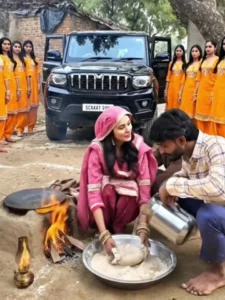
8-second cinematic comedy video, ultra-realistic, 4K, film look, **REFERENCE IMAGE REQUIRED**, **LOCK MAIN MAN IDENTITY – SAME PERSON ONLY**, face must match the reference 100%, do NOT change, replace, beautify, or age the man, keep the man seated in the SAME POSITION, not moving; a BLACK SCORPIO arrives and stops dramatically nearby, 3 VERY BEAUTIFUL women step out quickly, one woman immediately sits down near a chulha and starts kneading atta seriously, the other 2 women join her and all 3 knead and roll dough together energetically, the first woman looks at the man and says “Baby… I got late in coming, the car got punctured,” then she asks “What should I make… paratha roti?”, the man stays seated and replies casually “Make something too, baby,” funny expressions, cinematic lighting, shallow depth of field, meme timing, dramatic yet hilarious mood.
How To Generate Your Video
Friends, using Google Flow AI is very easy. If you haven’t learned how yet, I’ll explain it to you step by step in this paragraph. If you follow these steps, you can easily generate a video using your image and the provided prompt.
- First, you need to copy the prompt given on this website.
- Then, click on the “Generate Your Video” button to go to the Google Flow website, and once there, sign in.
- Next, click on “New Project,” then in the dashboard, click on the “Text to Video” option,
- and then on the “Frame to Video” option.
- Add an image, and then paste the copied prompt into the dashboard.
- Finally, click on the “Generate” button and wait a few moments.
- It will then generate the video. The type of video it generates depends on the prompt you enter.
Conclusion
So friends, this is how you can do this AI funny video editing. I’ve explained the entire process to you and also provided a prompt. Now, using the prompt, add your image to Flow AI, paste the prompt, and generate your video. I’ve explained the complete process in the paragraph above; you can easily understand it by reading it. If you want more tutorials on trending video editing, keep visiting this website. Video editing is taught here.