Gas Cylinder Ai Video Editing – Hello friends! How are you all doing? Well, friends, in today’s article, I am going to teach you how to create a highly viral AI video edit. You may have already come across this AI video on social media—the one where a young man is sitting down when a police car pulls up beside him, and the officers hand him a gas cylinder. Now, while this AI video looks incredibly realistic, it was actually generated using a simple prompt—and the best part is, you can create this video yourself! So, friends, I am going to walk you through the entire process in detail within this article; just make sure to read it carefully.
Details Of Gas Cylinder Ai Video Editing
Given the rising inflation and the prevailing global circumstances of today, this specific editing trend has emerged. For instance, with the current widespread outcry regarding LPG gas prices, people have started creating AI-generated videos and memes centered around this issue. In this particular edit, we see a young man sitting down when, suddenly, several police vehicles pull up behind him. Officers step out of the vehicles, and one policeman—carrying a gas cylinder in his hands—approaches the young man and hands the cylinder over to him. While this scene appears realistic, it was actually generated using AI. You can create this yourself using a specific prompt, which I have provided in this article; however, please ensure you read through the entire process before attempting to generate the video.
Editing Process Of Video Generating
Friends, regarding the process for this editing task, let me tell you that it can be accomplished in a few very simple steps. To perform this edit, we will require an AI tool capable of generating videos. There are many such tools available—such as Grok AI, Flow AI, ChatGPT, and numerous others. However, we will utilize a tool that delivers results that are both perfect and realistic. For this purpose, we can use either Google Flow or Grok AI; you are free to use whichever tool you find most suitable. You will observe identical results with both options. I will demonstrate how to generate a video using Flow AI. Please copy the prompt provided below, and then proceed to read the following paragraph; it contains the complete instructions on how to create a video using Flow AI.
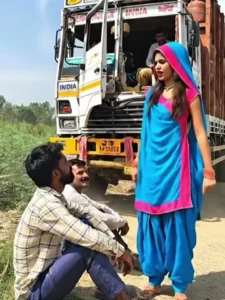
"Use the provided image as the base reference. The boy in the image must remain completely unchanged (same face, pose, lighting, and background).
Create a realistic cinematic scene where a Tata LPG delivery truck fully loaded with red gas cylinders enters the frame from the side. The truck should look slightly dusty, with natural motion, rotating wheels, and subtle road dust particles. It slows down and stops near the boy.
From the truck, a young Indian woman steps down naturally. She is wearing a blue color salwar kameez, simple and realistic, with natural hair and minimal makeup. She closes the truck door and walks confidently towards the boy.
She comes close to the camera (as if standing right in front of "us") and clearly says in a natural, slightly loud voice:
"Gas ki gadi aa gayi hai, jisko bhi cylinder lena hai jaldi le lo!"
Her lip movement should perfectly sync with the dialogue. Her expression should be practical and slightly loud like a real delivery announcement.
Add realistic sound effects: truck engine stopping, slight horn, background street ambience. Include subtle cinematic camera movement (slight handheld or slow push-in). Maintain natural lighting matching the original image, with soft shadows and depth of field.
The boy remains static and untouched — only the truck, girl, and environment animate. Keep everything ultra-realistic, smooth, and cinematic."
Note: Some CapCut templates may not open in certain regions due to the app’s own restrictions. If the template button doesn’t respond, please try again later or open it directly from the official CapCut app. This external link opens the original CapCut template in a new tab. We are not affiliated with CapCut; all rights belong to their respective owners, and we only provide links for user convenience.
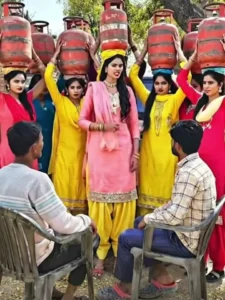
A cinematic rural roadside scene in India during daytime. A young man is standing beside a dusty road. Suddenly, a black Bolero SUV drives in from the left side and stops near him. A female delivery worker (daakiya style) is inside the car. On the front bonnet, a girl is sitting calmly, balancing a red LPG gas cylinder on her head. The car stops, the girl gets down smoothly, walks toward the man, gently places the cylinder on the ground in front of him, smiles, and says: "Ye lo, tumhara cylinder bhar diya hai." Natural lighting, realistic environment, smooth camera motion, slight dust particles in air, cinematic depth of field.
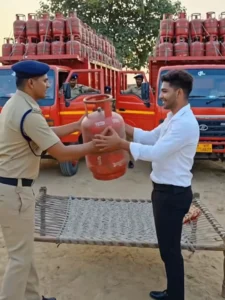
Video Prompt –
A realistic cinematic video generated from a reference photo of a man. The same man from the photo is standing beside a road in an Indian environment. Suddenly two large trucks loaded with many red Indane LPG gas cylinders drive into the scene and stop near him. The trucks are full of neatly stacked red LPG cylinders. After the trucks stop, a police officer in Indian police uniform walks toward the man carrying one red LPG cylinder in his hands. The police officer hands the cylinder to the man and the man receives it with both hands. Natural daylight, realistic environment, cinematic camera movement, smooth motion, high detail, realistic shadows, 4K quality.
How To Generate Your Video
Friends, using Google Flow AI is very easy. If you haven’t learned how yet, I’ll explain it to you step by step in this paragraph. If you follow these steps, you can easily generate a video using your image and the provided prompt.
- First, you need to copy the prompt given on this website.
- Then, click on the “Generate Your Video” button to go to the Google Flow website, and once there, sign in.
- Next, click on “New Project,” then in the dashboard, click on the “Text to Video” option,
- and then on the “Frame to Video” option.
- Add an image, and then paste the copied prompt into the dashboard.
- Finally, click on the “Generate” button and wait a few moments.
- It will then generate the video. The type of video it generates depends on the prompt you enter.
Conclusion
Now, friends, I hope you have understood the process of creating these AI-edited videos. Since this trend is currently going viral, you should take advantage of it; generate your own videos and share them on social media to significantly boost your chances of going viral. Furthermore, if you wish to learn how to create other unique AI-edited videos like this, you can check out the ‘AI Editing’ category on this website, where you will find numerous prompts for trending AI video edits.