Br Ambedkar Ai Video Editing – Friends, as you all know, Bhim Jayanti is just around the corner; every year, it is celebrated on April 14th. People have already started sharing video edits and photo edits on social media in anticipation of Bhim Jayanti, creating visuals that feature them alongside Babasaheb. Nowadays, people are increasingly leveraging the power of AI for this purpose. One such AI-generated video is currently going viral, depicting a young man serving Babasaheb. This video was created using a specific AI tool. You, too, can create a similar AI video for yourself—one in which you appear alongside Babasaheb. So, friends, if you would like to create your own AI video for April 14th, simply follow the instructions in this article. I will teach you how to create this video in a simple manner, using a specific AI prompt.
Details Of Br Ambedkar Ai Video Editing
In this video, we see Babasaheb lying on a cot in the courtyard of a villager’s mud house. Sitting at his feet, a young boy is massaging them while gazing up at him. Babasaheb, meanwhile, is laughing as he speaks to the boy. The entire scene feels incredibly realistic, capturing the authentic atmosphere of a village evening. However, this is not a real video; rather, it was created using AI. The level of detail incorporated into the prompts is so precise that it renders the video absolutely lifelike. Friends, when you create your own version of this video, you will be able to step into the shoes of that young boy yourself. Let me walk you through the entire process.
Friends, in a second edited sequence, we see a girl sitting on a staircase—stairs that appear as though they lead to heaven. Directly in front of her stands a large image of Babasaheb. Then, in the very next moment, the video comes to life; the girl looks forward, gazing at Babasaheb, who is seen extending his hands to bestow his blessings upon her. This video looks incredibly realistic, yet it was created using AI.
What You Need To Do This Editing
To perform this video editing task, we will require a few specific resources. We are going to generate this video using an AI tool. You will find various AI tools available for creating AI-generated videos—such as Grok AI, Google Flow AI, and other similar video generation platforms—that can be utilized for this purpose. In this tutorial, I will demonstrate how to create a video using Flow AI. Additionally, the second thing we will need is a photograph. So, please get a standard photograph of yourself ready—specifically one where you are standing near a house—as this is the specific type of image you will need to use to create the video. You will need to combine this photograph with a video prompt. I will explain the entire process in the following paragraph.
Note: Some CapCut templates may not open in certain regions due to the app’s own restrictions. If the template button doesn’t respond, please try again later or open it directly from the official CapCut app. This external link opens the original CapCut template in a new tab. We are not affiliated with CapCut; all rights belong to their respective owners, and we only provide links for user convenience.
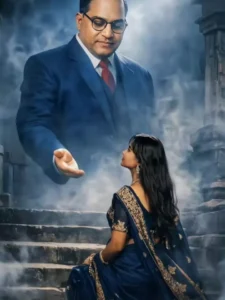
Create a highly dramatic and cinematic Person Behind him, generate a massive, dr babasehb Ambedkar The divine figure should appear like a protective guardian emerging from smoke and shadows, placing a gentle, powerful hand over the man's head as if giving him strength. Use dark, moody lighting with strong contrast, smoke effects, rim lights, and hyper-realistic textures. Make the entire image intense, powerful, and motivating. tra-realistic, &KJigh detail dramatic atmosphere
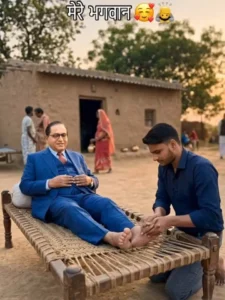
A realistic rural Indian village scene during golden hour, warm natural sunlight, मिट्टी का घर background में, पेड़ हल्के हवा में हिलते हुए, cinematic depth of field. A traditional wooden charpai placed in the center.
A dignified man dressed in a blue suit, resembling Dr. B. R. Ambedkar, lying relaxed on the charpai.
A young woman (use reference image) enters the frame from the side with calm and respectful expression, walks towards the charpai, softly sits near his feet and gently starts pressing his feet with both hands, showing devotion and respect.
Background villagers moving naturally, slight motion blur, authentic rural atmosphere, dust particles glowing in sunlight.
Camera slowly pushes in (cinematic zoom), focus shifting from wide scene to emotional close-up of the moment.
Ultra realistic, high detail, natural skin tones, soft shadows, no distortion, no extra characters added, smooth motion.
How To Generate Your Video
So friends, to generate such AI videos, we need to follow a few simple steps. Which I’ll explain in this article. First, click the “Generate Video” button. This will take us directly to the Flow AI website. Log in with your email address. Then, click the “New Project” option. There’ll create a project. Click the “Text” option on the dashboard below, then select “Frame” and “Video.” Then, click the “+” icon to add an image and type some text in the box I’ve provided below the image on my site. Copy this prompt and paste it there. Then, click the “Generate” button. After a few moments, our video will be ready, and it will look realistic. This is how you’ll create your video.
Conclusion
So friends, in this way, you too can create AI videos featuring Babasaheb—videos that look absolutely realistic and in which you appear to be serving him with wholehearted devotion. Simply follow the process that has been outlined for you. Furthermore, if you are looking for more prompts for this kind of trending AI video editing, be sure to check out the ‘AI’ category; you will find a multitude of prompts there to help you create various trending AI videos.