Bike Ai Video Editing – Friends, nowadays, various AI-generated videos are constantly going viral, and some of them become so popular that they create a trend, and everyone starts generating similar videos. Currently, this AI video featuring a guy on a bike is going viral. In it, a boy is seen riding a bike, but neither the bike nor the video is real; it was created using AI, specifically from a single photo. So, if you also want to create such a viral AI video with a bike, read this article. I will teach you how to create this trending bike AI video, and you’ll be able to make your own video in just a few minutes. Let’s get started!
About This Bike Ai Video Editing
Look, this video was created with the help of AI, and it’s going incredibly viral. In it, we see our image, and suddenly a motorcycle appears from behind us. We then get on the bike and ride away. It looks so realistic, like it’s happening in real life, and people are loving this kind of video because it’s a new trend and is attracting a lot of attention. If you don’t know how to do this, let me tell you that you can create this kind of video using just a normal photo of yourself. Your photo will be converted into a video where the motorcycle will actually be moving. So, I’m explaining it to you in a simple way in this article. Read on.
What Is Google Flow Ai ?
Look, we’re going to use this tool for our video editing, which is known as Google Flow AI, and with its help, we’ll create videos from our images. This tool is based on an advanced machine learning and generative AI model. The user simply needs to provide a clear and detailed prompt, specifying the type of image or design they want. Flow AI then analyzes the prompt and generates a high-quality output in just a few seconds. The prompt I used will be provided below the image in this article; you can copy it. Creating videos with Flow AI is very easy. I’m explaining how to use it in simple language in the next paragraph; you can read it and easily generate your own videos.
Update – Friends, today in this article I am sharing another new trending bike AI video editing in which you will see that a man is sitting on an old bike which has no wheels on both the wheels and there is a helicopter fan attached on the handle of the bike. Then the man starts the bike and the fan starts rotating rapidly and the next moment the bike flies in the air like a helicopter, just like a helicopter flies. This is an AI video and we will make it with the help of a prompt, so you can copy the prompt given below the image below and make your AI video by reading the process.
Note: Some CapCut templates may not open in certain regions due to the app’s own restrictions. If the template button doesn’t respond, please try again later or open it directly from the official CapCut app. This external link opens the original CapCut template in a new tab. We are not affiliated with CapCut; all rights belong to their respective owners, and we only provide links for user convenience.
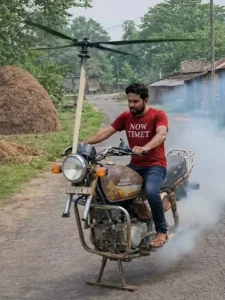
“A realistic cinematic scene. A person from a normal portrait photo suddenly appears sitting on a motorcycle on an open road. After a moment, a helicopter-style rotor fan unfolds from the front side of the bike near the handle. The rotor starts spinning fast, wind blowing around and dust moving. The bike slowly lifts off the ground and starts flying in the air like a flying bike. Smooth cinematic camera movement, ultra realistic, dramatic lighting, 4K quality, 8-second video
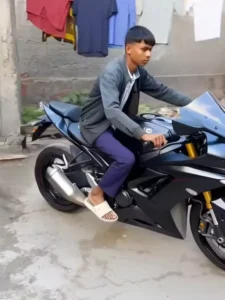
Video Prompt :-
A man suddenly stands confidently, a sports bike from MINIMAXROO approaches him from behind and stops behind him. "Then this man goes and sits, drives the bike away.
How To Generate Your Video
So friends, to edit this trending video, we will need an AI tool created by Google. Its name is Google Flow AI. And we will be using this tool to generate our video. So let me tell you the steps; you can follow them to complete your video editing. First, you need to copy the given video prompt. The image you want to use is also provided in the prompt; copy that as well, and then click on the “Generate Your Video” button. This button will take you directly to the official Google Flow website.
Now, we will generate our video here. First, click on the “New Project” option to create a new project. Then, in the dashboard, you will see the “Text to Video” option; click on it and select “Frame to Video.” Then, add your image using the plus icon and paste the prompt. After that, click on the “Send” button and wait for a while. Your video will start generating, and then an AI-generated video will be ready, just like the one you saw on social media. It will feature your face and will be created from your photo. This is how you can create this trending video.
Conclusion
Now you too can do this editing yourself. You just need one image, and you can create your own trending video edit. Friends, if you want to go viral, you’ll have to do something unique, and for unique editing ideas, keep visiting this website. Here you’ll find trending editing ideas. I hope you like this AI bike video editing. Please share your feedback with us so that we can keep providing you with more trending AI content.