Viral Ai Video Editing – Welcome to today’s article! Friends, in this post, I am going to teach you how to create viral AI videos. You have surely come across these AI videos, which are currently trending everywhere; I will walk you through the entire process of creating them using an AI tool. If you follow the steps outlined in this article, you will learn exactly how to perform this AI video editing, enabling you to generate your own personalized AI videos just like the viral ones. If you are curious to know how it’s done, simply follow along with this article, and I will guide you through the entire process.
Details Of Viral Ai Video Editing
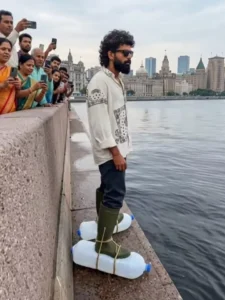
Friends, as you have surely noticed, this AI video features a highly realistic and cinematic aesthetic. At first glance, it does not appear in the slightest to have been created by AI; yet, in reality, it was indeed generated by artificial intelligence. In the video, you see a man who has strapped two large plastic containers to his feet; he then steps forward, leaps into a pond situated in front of him, and proceeds to walk across the surface of the water. It looks exactly as if he were walking on solid ground, but he is actually walking on the water, buoyed by those air-filled plastic containers. Friends, this seemingly magical scene is so astonishing that people are mistaking it for a real video and sharing it widely—a phenomenon that is causing the video to go viral. Therefore, you too can create a similar video and achieve viral fame.
What You Need To Do This Editing
To create this specific AI-edited video, you will need a few things. First, we need to prepare a prompt; since we aim to create a specific type of video, we require a highly detailed prompt that clearly outlines every element. Once we provide this prompt to the AI, it will generate the video. You will find the necessary prompt included in this article. Second, you will need a personal image of your own; go ahead and get one of your own photos ready. Third, you now require an AI tool capable of generating AI videos. There are various AI tools and applications—such as Grok AI, Flow AI, and YT Create—that you can use to generate videos. Let me suggest the easiest method. You can generate your video using Google’s Flow AI. I will guide you through the process of generating a video using Flow AI; simply read the instructions in the next paragraph and use the provided prompt to create your video.
Update – Friends, today in this article, you’re being prompted to try a new technique: video editing, which allows for incredibly creative videos, and you’ve likely seen them on social media. To create this video, you’ll first create the image with Chatgpt and then generate the video using Flow AI. The full tutorial is available on our Instagram.
Video Prompt –
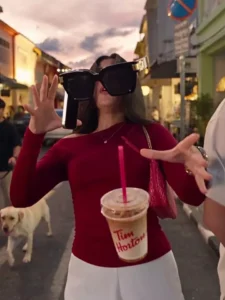
9:16 vertical video, 12-second single continuous take with no cuts, photorealistic ARRI Alexa 35 luxury fashion film aesthetic, 4K resolution, shallow depth of field. The protagonist strictly matches @Image 1 in identity, face, hairstyle, clothing, and footwear. The urban street environment and lighting are inspired by @Image 2, while the wearable hero product strictly matches @Image 3. Props are locked to exactly one vintage silver-grey open clamshell flip phone (two-part hinged design, explicitly not a smartphone), exactly one paper takeaway coffee cup with plastic lid, and exactly one passerby walking one leashed Labrador. From 0s-4s, in real-time speed, a low-angle tracking shot begins at the protagonist’s shoes and smoothly cranes upward, revealing the protagonist walking forward while actively talking on the open flip phone held in the right hand and carrying the coffee cup in the left hand; an opposite pedestrian walking a leashed Labrador passes by. At exactly 4s, an accidental elbow bump causes a sudden collision, knocking the phone, coffee cup, and @Image 3 hero product loose; immediately afterward, both of the protagonist’s hands are completely empty. From 4s-10s, transition into extreme bullet-time slowdown at 2% speed, creating a frozen 3D world while the motion-control camera continues gliding smoothly and continuously: first dolly toward the suspended @Image 3 hero product with a subtle orbital macro pass revealing its premium surface details, then glide toward the frozen coffee cup with its plastic lid partially popped open and suspended liquid droplets visible in mid-air, followed by a macro push-in toward the open vintage flip phone, clearly revealing its central hinge, physical keypad, and illuminated screen displaying the text “BOSS.” From 10s-12s, the camera smoothly pulls back into a wide cinematic tableau as time and gravity instantly snap back to 100% normal speed; the protagonist stumbles naturally, the coffee splashes onto the pavement, and the flip phone bounces on the ground. End on a dynamic cinematic low-angle ground-level frame with premium luxury-fashion-film composition, realistic physics, natural motion blur, detailed textures, controlled highlights, and consistent character/product identity throughout.
Other Ai Video Prompts –
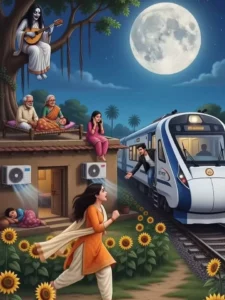
Image prompt -
A peaceful Indian village at night under a glowing crescent moon, ultra-detailed digital illustration, cinematic aerial view. A traditional two-story rural house with a family sleeping together on the rooftop under colorful blankets. Warm yellow light glowing from windows and doorway. A woman cooking in the kitchen. visible through the window. Water tank on the roof, clothes hanging on a line, clay pots near the entrance, hand pump with water reflection. Green agricultural fields stretching into the distance, a blue tractor driving on a dirt road with headlights on. A passenger train passing far across the fields. Cows and goats resting beside the house. Large electric transmission tower and power lines crossing the landscape. Massive moonlit clouds, starry sky, dreamy blue atmosphere, soft moonlight, cozy rural lifestyle, highly detailed environment, realistic lighting, vibrant colors, storybook art style, fantasy realism, masterpiece, 4K, ultra sharp, vertical composition, depth and perspective, peaceful countryside night scene.
Video Prompt –
Transform this image into a peaceful anime-style cinematic scene. Add gentle natural motion throughout the environment. Soft clouds slowly drifting across the sky, moonlight subtly glowing, stars twinkling, tree leaves and grass moving lightly in the breeze. Warm lights from windows flickering softly. Water reflections gently rippling. Distant train moving slowly with glowing lights. Subtle camera push-in with smooth cinematic movement. Maintain original composition, colors, characters, and atmosphere. Cozy countryside feeling, relaxing ambience, dreamy anime aesthetic, Studio Ghibli-inspired mood, ultra-smooth animation, highly detailed, calming nighttime environment, seamless natural motion, cinematic depth, peaceful and immersive, 4K quality.
A young Indian boy wearing a pink jacket and black jeans is standing near the edge of a deep rocky pit in a dry desert-like area. The camera starts from behind, slowly tracking him as he walks forward with confidence. As he steps into the pit, instead of falling, he suddenly stops mid-air and starts floating. The camera dramatically zooms and rotates around him, showing him levitating inside the deep canyon. Dust particles float in the air, cinematic lighting, realistic shadows.Background audio: shocked people shouting in Hindi — “Bhai wo dekh! Hawa me udne laga!” “Arre gir gaya tha par ud raha hai!”The boy slowly rises upward in the air with a divine glow effect, wind blowing his clothes slightly, epic cinematic vibe, ultra realistic, 4K quality, slow motion, dramatic background music.
How To generate Your Video
So friends, to generate such AI videos, we need to follow a few simple steps. Which I’ll explain in this article. First, click the “Generate Video” button. This will take us directly to the Flow AI website. Log in with your email address. Then, click the “Create Project” option. We’ll create a project. Click the “Text” option on the dashboard below, then select “Frame” and “Video.” Then, click the “+” icon to add an image and type some text in the box I’ve provided below the image on my site. Copy this prompt and paste it there. Then, click the “Generate” button. After a few moments, our video will be ready, and it will look realistic. This is how you’ll create your video.
Conclusion
So friends, by following these steps, you can generate this viral, realistic AI video. We have outlined the simplest method for you, allowing you to create a video with ease. If you wish to create more unique and trending AI videos like this, simply visit the “AI” category on this site; there, you will find various AI video editing tutorials that will enable you to produce unique and realistic AI videos.