જય ખોડિયાર માઁ Capcut Template – Friends, if you are interested in creating a devotional-style video—and wish to uphold your traditions and faith even in today’s modern era by leveraging technology to produce culturally rich content—then that is truly a wonderful endeavor. In this article, I will teach you how to perform a fantastic video edit. Specifically, I will guide you through the process of creating a video dedicated to Mata Khodiyar, allowing you to incorporate your own personal video clips into this devotional bhajan edit.
This editing style features a trending devotional song dedicated to Mata Khodiyar; furthermore, by utilizing a pre-designed template, you can execute this entire edit effortlessly with just a single click—meaning you won’t need to undergo any formal video editing training. You can perform this entire editing process directly on your phone using a single application. Come, let me walk you through the complete procedure; simply read this article carefully to create your own devotional video.
Details Of જય ખોડિયાર માઁ Capcut Template
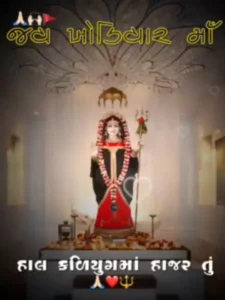
As you can see, this video edit features a Gujarati devotional song dedicated to the Goddess Khodiyar Mata. The editing style has been tailored specifically to match this theme, presenting the content in a distinct “lyrics video” format. In the template preview, you will observe that the video utilizes an image featuring a statue of Mata Khodiyar, upon which the entire editing process has been applied.
At the beginning of the video, the lyrics of the song appear alongside the image of Mata Khodiyar; these lyrics are displayed using a stylish Gujarati font and are perfectly synchronized to play in time with the actual song. Additionally, emojis have been incorporated into the design, and the video prominently features the large text “Jai Khodiyar Mata.” Furthermore, the video incorporates beat-sync editing techniques, such as flashing lights and shake effects, which are precisely synchronized with the rhythm of the music. You can utilize this template to insert your own video clips and create your very own devotional video edits.
Benefits Of Using This Template
Friends, using this template offers you numerous benefits. First and foremost, your video will be created with a devotional editing style—a feature rarely found in most templates. Furthermore, since this is a Gujarati template, you can easily create videos in your own local language. As for the editing itself, utilizing this template ensures that your standard video is automatically transformed into an attractive, polished production, requiring no manual effort on your part. You can achieve professional-quality editing with the help of this template, even without having any prior editing skills. Now, I have provided the template details below the image; you can review them by reading through the instructions. The step-by-step process will be explained in the following paragraph.
How to Use જય ખોડિયાર માઁ Capcut Template
As you can see, I have provided you with links to this templates; however, you now need to know how to use them correctly to ensure they work 100% effectively. If you are unsure how to utilize CapCut templates, please read this paragraph carefully. It outlines the step-by-step process for using these templates, enabling you to easily edit your videos using any CapCut template.
- First, click on the “Check Template” button; this will redirect you to the application, where the template will open automatically.
- Note that this will only work if you already have the CapCut application installed
- Otherwise, you must first install the official version of CapCut on your phone.
- Once you do that, click the “Check Template” button again.
- You will see a preview of the template, along with an option to use it located beneath the preview.
- Click on the “Use” button to add your clips—simply add as many clips as required for your video.
- Afterward, click the “Next” button. After a brief wait, the application will automatically edit your video for you.
- You can then share this video; to save it to your device, simply click the “Export” button located at the top of the screen.
Conclusion
I hope you will truly enjoy this video editing template featuring Goddess Khodiyar. You can use either video clips or photos within it. Friends, simply follow the process I have outlined to complete your editing. Please keep in mind that you must have the CapCut application installed to use this template. I hope you liked the editing template; please be sure to share your feedback with us in the comments section.