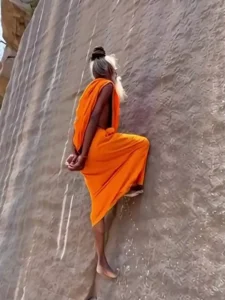
Mountain Climbing Ai video Editing – Friends, AI videos are going incredibly viral on social media these days, and people are now easily generating highly creative, unique, and funny AI videos using various AI tools. One such video is currently making the rounds on social media; it features a man standing near a steep mountain who suddenly places both hands behind him, presses himself against the rock face, and begins to climb. Friends, this video was created using AI—and you, too, can create your own video in which you appear to be climbing a mountain. Generating this video is incredibly simple; I will provide you with a specific video prompt within this article, and with its help, you will be able to generate your own video with ease. In this article, I will walk you through the entire process.
Details Of Mountain Climbing Ai video Editing
First, let’s explore this specific type of editing. As I mentioned earlier, in this edit, we see a person suddenly standing near a mountain; then, with both hands free, they begin to scale the rock face. It appears as though they possess some extraordinary power, as they ascend the mountain with absolute ease—without the aid of any ropes or external equipment. Visually, the result looks quite astonishing and creative. This effect was generated with the assistance of AI—specifically through the use of a prompt—and you, too, can create your own videos in which you appear to be climbing a mountain. The overall atmosphere of the video will be distinctly cinematic and realistic. Friends, we can generate this effect by utilizing an AI tool and simply pasting a specific prompt into it.
What You Need For This Ai Video Editing
Look, to perform video editing here, you won’t need much—just two things: a photo of yourself and a prompt. To create this video, you will be using one of your own photos; simply have a standard photograph ready. Ideally, select a photo where you are standing near a wall or beside a large mountain—either prepare such an image in advance or take a new one specifically for this purpose by standing next to a wall. Next, to utilize that photo, copy the video provided within this article. Then, read through the video generation process instructions, and finally, use the “Generate Video” button to create your video with the help of the AI tool.
Create an 8-second cinematic video from the uploaded image.
Transform the person so they appear to be climbing sideways on a steep vertical mountain or rock wall, defying gravity. The orientation should look natural, as if the person is walking/climbing along the wall surface.
From 0–3 seconds, show slow upward movement along the vertical rock wall with realistic body motion, natural hand and foot placement, and subtle cloth movement.
From 3–6 seconds, add smooth cinematic camera movement (slight zoom and tilt), with depth and height feeling. Include wind effect, dust particles, and realistic lighting.
From 6–8 seconds, slow down slightly and create a strong cinematic moment while the person continues climbing. Add depth of field, natural shadows, and high detail.
Ensure ultra realistic physics, correct body alignment, 4K quality, smooth motion, and cinematic atmosphere.
How To Generate Your Video
Friends, using Google Flow AI is very easy. If you haven’t learned how yet, I’ll explain it to you step by step in this paragraph. If you follow these steps, you can easily generate a video using your image and the provided prompt.
- First, you need to copy the prompt given on this website.
- Then, click on the “Generate Your Video” button to go to the Google Flow website, and once there, sign in.
- Next, click on “New Project,” then in the dashboard, click on the “Text to Video” option,
- and then on the “Frame to Video” option.
- Add an image, and then paste the copied prompt into the dashboard.
- Finally, click on the “Generate” button and wait a few moments.
- It will then generate the video. The type of video it generates depends on the prompt you enter.
Conclusion
Friends, I hope you have now fully grasped the entire video editing process. You can now easily edit your own videos—specifically, a “climbing the mountain” style video—in which you appear to be effortlessly scaling a mountain without the aid of any person or object. This scene will look completely realistic, and you can create the entire video in under two minutes. All the necessary instructions have been provided; simply follow them to create your video. If you are looking for more trending video editing tutorials like this one, you can check out this website.