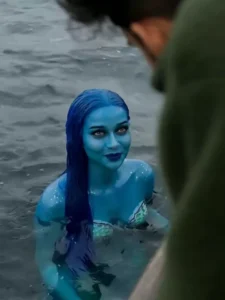
Mermaid Ai Video Editing – Friends, in today’s article, I am going to share information with you about a viral AI video editing trend. You have surely come across this viral video on social media, which looks incredibly realistic. In it, we see an AI-generated mermaid that appears just like a real one, even though the video was created using AI tools. And friends, you too can create this very AI video yourself. This article provides a specific video prompt that you can use to generate the video. If you wish to learn the entire process, simply read through this article, and you will be able to generate this AI video with ease.
Details Of Mermaid Ai Video Editing
In this video edit, you will see yourself traveling across the ocean in a boat, with people seated around you. Suddenly, a mermaid approaches the boat; she begins conversing with you and then gently touches your hands. She is smiling, and you—looking at her in sheer amazement—are smiling back. This scene looks absolutely cinematic and realistic. Furthermore, this video was created using AI. To produce this, we will require just a single prompt and a photograph. I have provided the necessary prompt for this edit below; please proceed to read through the subsequent steps of the process.
Which Ai Tool We Will Use
Friends, to perform this editing, we will require an AI tool that enables us to generate videos. Nowadays, there are various tools available for creating AI videos—such as Grok AI, Google Flow AI, ChatGPT, and many others—that we can utilize to produce our own AI-generated content. I will guide you through the technique of creating a video using Flow AI. You don’t need to do anything complicated; simply read through the video creation process using Flow AI—which I am about to outline in the next paragraph—and then, by following those steps and utilizing the appropriate prompts, you can generate this video yourself.
A cinematic transformation scene where the uploaded photo gradually morphs into a realistic ocean environment. The person in the image is now sitting on a wooden boat in the middle of a deep blue sea under a cloudy sky. The camera slowly pans from a wide aerial shot to a close-up of the person leaning slightly over the edge of the boat.
Suddenly, water ripples intensify and a mystical mermaid emerges from the ocean, with glowing blue skin and long flowing wet hair. She rises gracefully near the boat, looking directly at the person. Water droplets splash in slow motion, creating a dramatic and magical atmosphere.
The lighting is moody and cinematic, with soft fog, ocean waves moving realistically, and wind affecting hair and clothes. Add subtle background sound of waves and people murmuring in surprise.
Style: ultra-realistic, cinematic, 4K, shallow depth of field, dramatic lighting, smooth transitions, slow motion, fantasy realism.
How To Generate Your Video
Friends, using Google Flow AI is very easy. If you haven’t learned how yet, I’ll explain it to you step by step in this paragraph. If you follow these steps, you can easily generate a video using your image and the provided prompt.
- First, you need to copy the prompt given on this website.
- Then, click on the “Generate Your Video” button to go to the Google Flow website, and once there, sign in.
- Next, click on “New Project,” then in the dashboard, click on the “Text to Video” option,
- and then on the “Frame to Video” option.
- Add an image, and then paste the copied prompt into the dashboard.
- Finally, click on the “Generate” button and wait a few moments.
- It will then generate the video. The type of video it generates depends on the prompt you enter.
Conclusion
So friends, you can now easily generate this AI-powered mermaid video by following the process outlined here. With the help of AI, it is possible to create virtually any kind of video with ease. We hope you enjoy this article and that you are able to effortlessly create your own AI video featuring a mermaid. If you are looking for more creative AI video editing prompts like this, please visit the AI category on this website.