Gym Trending Video Editing – Friends, today in this article I’m going to give you information about a special video editing technique that you can do with the help of AI. This type of video is going viral on social media these days, and many people want to create similar videos, but they don’t know how. Therefore, in this article, I’m providing a complete tutorial on how you can create and edit your own clips with the Hanuman Ji AI image. I will explain the entire process; you just need to read the article first, and then follow the steps to do the editing. Let’s learn about it paragraph by paragraph.
Details Of Gym Trending Video Editing
First, let’s understand this editing technique. So, friends, this video shows a man lifting dumbbells in a gym, which are quite heavy. Then the video pauses, and immediately another clip appears, which is a still image. This image was created using AI, taking a screenshot from the original video and then editing it with AI. The main part of this video, and the reason it’s going viral, is this image. In this image, we see the man from the video, and in the background, there’s a fierce image of Lord Hanuman. In the image, Lord Hanuman appears to be placing his hand on the man’s head. It seems as if God is with him and supporting him. This video is going viral, so I’m going to teach you how to create this AI-generated image. You can take a screenshot from your own video and edit it with AI to include Lord Hanuman. Let me explain the process.
Editing Process
Look, the image used in this video is the main part of the editing, because the beginning uses a normal video without any editing. All the editing is done on the image, so we’ll learn how to create that image. First, we need to create an image using AI. We’ll use Google Gemini for this because it gives us excellent results. Almost everyone knows how to use Gemini, so I’ll explain the process briefly. You can read about it in the next paragraph, and with the help of the prompt, you can create the image and add it to your video.
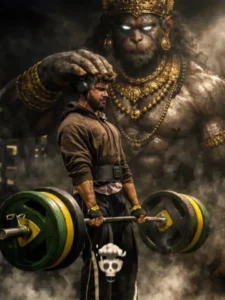
Photorealistic cinematic gym scene, male lifter centered performing a deadlift on a wooden platform, heavy green and yellow bumper plates, muscular physique, realistic sweat and skin texture, dramatic low-key lighting with a strong top/right rim light, deep shadows and contrast, volumetric smoke/fog rising around the feet, ultra-detailed, filmic grain, shallow depth of field, 35mm cinematic lens feel, 4k photorealism. In the background: a colossal, shadowy Hanuman-like guardian spirit towering behind the lifter — enormous muscular primate deity with glowing white eyes, ornate antique gold crown, heavy gold necklaces and bracelets, intricate jewelry details, subtle smoky aura so spirit feels part of the same scene, dark desaturated palette with rich gold highlights, dramatic chiaroscuro, ultra-real textures on metal and skin, sharp detail on weights and gym equipment, cinematic mood, highly realistic, believable lighting and shadows, maintain original posture and expression from reference.
2nd Image Prompt:-
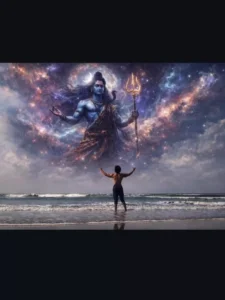
Photorealistic cinematic gym scene, male lifter centered performing a deadlift on a wooden platform, heavy green and yellow bumper plates, muscular physique, realistic sweat and natural skin texture, dramatic low-key lighting with a strong top/right rim light, deep shadows and high contrast, volumetric smoke and fog rising around the feet, ultra-detailed, filmic grain, shallow depth of field, 35mm cinematic lens feel, 4K photorealism.
In the background: a colossal, shadowy Lord Mahadev (Shiva) guardian spirit towering behind the lifter — an enormous, powerful divine figure with a calm yet intense expression, glowing white/blue eyes, long flowing matted hair (jata) tied with a crescent moon, subtle Trishul silhouette, sacred rudraksha malas around the neck and arms, faint ash (vibhuti) texture on the body, intricate spiritual detailing, and a soft ethereal smoky aura so the deity feels naturally blended into the same scene.
Dark, desaturated cinematic palette with cool blue-grey tones and subtle silver highlights, dramatic chiaroscuro lighting, ultra-realistic textures on skin, sweat, metal weights, and gym equipment, believable shadows and reflections, sharp detail on weights and platform, cinematic mood, highly realistic and grounded, maintain original posture and facial expression from the reference, no face reshaping, no beautification, natural proportions.
3rd Prompt:-
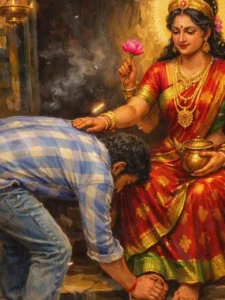
A divine Indian goddess Lakshmi seated gracefully inside an ancient temple, blessing a young devotee who is bowing down and touching her feet with deep devotion. The goddess is wearing a rich red silk saree with golden zari borders, heavy traditional gold jewelry, layered necklaces, bangles, earrings, and a majestic golden crown. A glowing golden halo surrounds her head, symbolizing divinity. She holds a pink lotus flower in one hand and a sacred golden pot (kalash) in the other.
Her expression is calm, compassionate, and motherly. One hand is gently placed on the devotee’s head, blessing him. The devotee is a modern Indian man wearing a blue checkered shirt, jeans, and shoes, bending respectfully at her feet.
The temple interior is dimly lit with warm golden light, oil lamps hanging in the background, soft incense smoke floating in the air, creating a spiritual and mystical atmosphere. The floor has traditional rangoli symbols near the goddess’s feet. Ultra-realistic digital painting, highly detailed textures, cinematic lighting, dramatic shadows, warm color palette, devotional art style, Indian mythological artwork, realistic fabric folds, glowing particles in the air, depth of field, 4K resolution, masterpiece quality, vertical portrait composition.
How To Crete Your Image
So friends, to create this image, you need to use Gemini. First, copy the prompt given below the image. Then, click on the “Create Image” button to go to the Gemini website. Here, we will create the image. Paste the prompt you copied into Gemini and add the screenshot from your video using the plus icon. Make sure you take the screenshot from your own video; do not use any other image. Now, click on the send button and wait a few moments. Your image will be ready, showing Hanuman’s hand on your head and Hanuman’s image in the background.
Conclusion
This is how you can also create your own viral image with Hanuman Ji. Friends, after creating the image, you can use any editing application to add this image to the beginning of your video clip and add a shake effect to the image. Your video will then be ready. This way, you can create both your image and a video. Friends, I hope this prompt will help you, and you will now be able to easily do Hanuman Ji video editing. I hope you liked this article. Please share it.