Lifting Home Ai Video Editing – These days, people are using AI to edit videos in different styles and sharing them on social media. Their videos are going viral because they are unique and different. People are amazed because the videos look so realistic. Today, I’m going to show you a tutorial for a viral AI video editing technique that you’ve probably seen on Instagram Reels. It’s going viral, and the person who created and shared it has received millions of views. Seeing its growing popularity, I decided to create a tutorial, and I’m sharing it with you today. We’ll be creating this video using an AI tool. The entire video will be ready using just one image. We don’t even need to create the video ourselves; we’ll simply share the image and a prompt with the AI tool, and it will generate an AI video for us. It’s a very simple process. I’ll guide you step by step. Read the article, and then generate your own AI video using the provided prompt.
Details Of Lifting Home Ai Video Editing
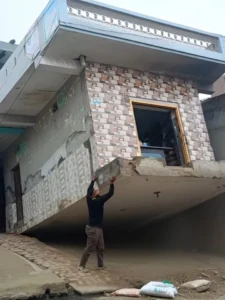
So, first, let’s learn about video editing and what’s going to happen in this video. In the video, we’ll see a person standing near a house, and then suddenly, they start uprooting the house next to them. The house is uprooted from the ground as easily as if someone were pulling up a plant. The man then lifts the house with his hands and carries it away, holding it above his head. The video looks incredibly realistic, as if someone actually lifted the house. This realistic AI video was created using Google’s Flow tool, and we will create our own video using the same tool, featuring ourselves and our video, where we will be lifting a house. Let me tell you about the tool.
What Is Google Flow Ai
Look, this is a modern artificial intelligence tool developed by Google, specifically designed to edit or enhance any video or image quickly. This tool helps automate and optimize text, images, videos, and other digital content through a smart process. The main objective of Google Flow AI is to provide users with better and more professional output in less time, whether it’s for content creation or design. Its key feature is its ability to understand the tasks we give it and deliver excellent results. With its help, we can easily create videos from images, text, or perform many other tasks. It requires the correct prompt for generation, according to which it operates. This tool, created by Google, is currently performing exceptionally well in video generation. It takes our creative ideas and transforms them into realistic outputs.
Video Prompt:-
A hyper-realistic cinematic video created from my uploaded photo as the base.
The same house visible in the photo remains in its original place.
The subject from the photo stands beside the house.
The ground shakes gently as cracks spread outward and loose soil breaks apart.
With natural, realistic body motion and subtle breathing, the subject grips the base of the house with both hands and slowly lifts it from the ground.
Dust and small debris fall as the house comes free, foundation and soil pieces dangling.
The subject raises the house above shoulder height and begins walking forward while carrying it.
Smooth physics-accurate movement, natural hair and cloth motion, soft sunlight rays, real-world shadows, and cinematic depth of field, 4K hyper-real live-action realism, no exaggerated expressions.
How To generate Your Video
So friends, to generate such AI videos, we need to follow a few simple steps. Which I’ll explain in this article. First, click the “Generate Video” button. This will take us directly to the Flow AI website. Log in with your email address. Then, click the “Create Project” option. We’ll create a project. Click the “Text” option on the dashboard below, then select “Frame” and “Video.” Then, click the “+” icon to add an image and type some text in the box I’ve provided below the image on my site. Copy this prompt and paste it there. Then, click the “Generate” button. After a few moments, our video will be ready, and it will look realistic. This is how you’ll create your video.
Conclusion
So friends, I hope you have understood the tricks I explained. You should now be able to do this AI video editing. I have given you the video prompt and also taught you how to edit using the prompt. Now it’s up to you how you respond. I hope you understood our explanation. For more new and creative video editing tips and tricks, visit this website. Trending video editing tips and tricks are shared here.