Trending Baby Ai Video Editing – Friends, you must have seen these types of videos of children dancing, which seems almost impossible because very young children can’t dance like that. But these videos are being created with the help of AI, and they are going viral and look completely real. You can also create such videos with just one photo. I’m explaining the entire process in this article. Read the article, and you too can create realistic-looking dancing videos of children.
Details Of Trending Baby Ai Video Editing
Look at this edited video: it shows a little child, approximately 2 to 5 years old, dancing to the music, perfectly executing all the steps and moves like a professional dancer. However, this is impossible in real life because children that young cannot dance so perfectly. These videos are being created using an AI tool, making them look like real videos where the child is actually dancing. You can also do this kind of editing. You just need to know how to use the AI tool, which I will explain to you now. If you also want to create a video of your child dancing perfectly to the music, keep reading this article; I will explain everything in a simple way.
Why This Editing Is Viral?
Look, this editing style is going so viral that it has become a full-fledged trend. Everyone is making and sharing videos of their children. And people are really enjoying making these videos featuring their children dancing. Such trends are rarely seen, and when they do appear, they become very popular. We will create this using a photo. The best part is that it’s being created with the help of an AI tool, which is incredibly easy and allows us to create our video in a very short time. The AI tool we’ll be using is called Kaling AI, and everyone is creating their videos for free using this tool, which is why it’s going viral. So, I’ll teach you how to use Kaling AI in the next paragraph. Read it, and then you can create your own video.
Update – Look, this is today’s editing, it is an AI video editing of a baby with a Holi dialogue in which he is lip-syncing a Holi dialogue and is looking very cute, you can also make such a Holi greeting video of your baby with the help of one of his photos, you are given an AI video prompt below, you can copy it and by following the method to use, you can make an AI Holi video of the baby.

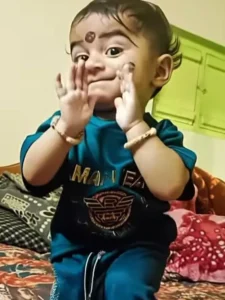
Video Prompt:-
A cute baby dancing exactly to the rhythm of the provided song, precise beat synchronization, joyful baby expressions, smooth natural movements, no exaggeration, realistic body motion, high resolution, social media reel style
How To Generate Video
Look, if you don’t know the steps to create a video with Kaling AI, I’ll explain them to you. Read this paragraph. First, you need to click on the “Generate Video” button. This will take you to the Kaling AI website. Here, we will create a video from an image, so log in here and select the “Text to Video” feature. Then, select the video option that appears below. Paste the prompt (I’ve already provided the prompt on my website). Then, add the image you want to use for the video. Click on the “Generate” button and wait for a while. Kaling AI will create your video. Now, if you like the video, you can save it.
Conclusion
Friends, this is how you can create a trending video from a single photo that will look completely real, and no one will be able to tell that it was created using AI. I’ve explained the entire process in a very simple way; just follow the steps. I hope you liked what I’ve shared. Don’t forget to share the article!