Ai Girlfriend Video Editing Prompt And VN Code – Hello friends, welcome to this article! Today I’m going to teach you how to create a romantic video edit. You’ve probably seen this neon girlfriend video edit where your image is shown with a girl standing in front of you, who is created using AI and appears as a silhouette. If you also want to create this type of edit, you should read this article. I will explain the entire process of creating this edit here. We will create this edit in two steps. First, we need to create an image of ourselves with the neon girl. And then we will turn that image into a video using a specific code. So, read the article; I will explain both steps in a simple way.
About This Ai Girlfriend Video Editing Prompt And VN Code
Friends, this edit was created with a neon AI girl. It shows a shadow of a neon girl standing in front of us, but she’s not real; she’s created with AI. And she’s asking us via text, “What if I found someone else?” The video starts like this, and in this editing style, we can add our own image. This edit doesn’t use many effects or transitions; it’s a realistic and romantic type of editing where the song lyrics appear as text over our image. When the neon girl asks us via text, the video zooms in on our image, and we respond to her with the song lyrics in text. This is a couple-style edit; you can use it to make your partner happy, and since it’s currently trending, sharing it increases the chances of your video going viral. Let me tell you what kind of image you should add to this.
How To Generate Image For Editing
Friends, to do this editing, we first need to add this neon girl to our own image, so let’s create the image first. You’ll find a prompt given below the image; copy it and open Gemini. I’ve provided the Gemini link. Now, in Gemini, paste this prompt and add your own image so that we get the image with the AI girlfriend. So, we’ll click on the ‘+’ icon and add our image. Then the send button will appear; click on it and wait for a few moments. Gemini will create an AI image for us with an AI girlfriend that has a neon effect. Now we’re going to turn this image into a video, following the current trend. I’ll teach you how to create it using a code, and I’m also providing you with the code. So, first read the process in the next paragraph, and then create your video using this code.
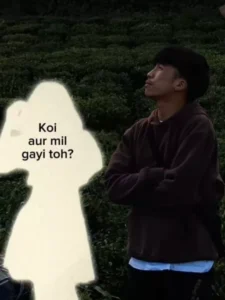
Image Prompt:-
“Retro ciematic photograph of a young man (uploaded mage) standing on a bridge at night, facing and softly talking to a glowing imaginary girl. The girl has a delicate feminine silhouette made of soft white light with smooth edges, appearing like a memory or dream. Both stand close, slightly leaning toward each other in conversation. The camera captures a medium side shot showing their profiles from the waist up, with blurred city lights behind them. The image should have a nostalgic retro film look – slightly faded colors soft focus, mild grain, and natural lighting. The glow from the gir should illuminate the man’s face subtly, with realistic shadows and highlights. The overall tone should be calm, emotional, and cinematic. resembling an old film still rather than a digital render. Add film texture, lens softness, and analog photo imperfections for authenticity.”
Vn Code For Video Editing :-

How To Generate Video
So friends, to do this editing, we need to create an image and then create a video using this code. So, save the given code for creating the image. After that, open the VN editor application. This app is available on the Play Store. Once the application is open, scan this code. You will see a scan symbol in the upper corner; click on it and scan the code. As soon as you scan it, the template will open, and you will see a preview of it. In the bottom corner, you will see a download button option. Click on the download button, and the template will be downloaded. Then, an option to use it will appear. Click on the “use” option and add an image from your gallery – the image we just created with the help of Gemini. Add this image, then click on the next button. You can preview it and make any adjustments if needed, otherwise, click on the export button to save the video. Your video is now automatically edited and ready. You can now share it wherever you want.
Conclusion
So, by following these two steps, you can create a trending video edit featuring your neon girlfriend. This girl isn’t real, but rather created by AI, and these types of videos are currently going viral, especially the romantic ones. If you want to impress your partner or friend, try making this kind of video; you’ll get great results. I hope you understood everything I taught you in this article and that you liked my explanation. Please share your feedback with us so we can continue to bring you more new content. See you in the next article with a new template!