Trending Ai Girlfriend Video Editing – Hello friends, welcome to today’s new article. Today I’m going to teach you another trending editing technique and will teach you everything you need to know about how you can create your own trending AI videos. So friends, as you all know, these AI images are going viral these days. To create these images, we simply create them using a selfie and then convert them into videos. For this, just read this article and follow my instructions and your editing will be complete. This is a very easy method, and we can create it in just 2 minutes. Everything will be edited automatically; you just need to give us a thumbs-up. So, in today’s paragraph, let’s learn how to create this outlined girlfriend video.
Details Of Trending Ai Girlfriend Video Editing
Friends, this video about a girlfriend is going viral for a different kind of reason. This is because videos of those who create videos with a different style are going viral more often. This means that it depends on our thinking and how we can create a compelling image. For this, we need to write a prompt so that Gemini creates an image that no one else has created. So, if you don’t know how to write a prompt, you can copy it from here. To make a video like this, we need to create an image with Gemini and then convert that image into a video. For this, you can read the information given in the next paragraph. Talking about this editing, the editing being taught today involves a scene in which you are lying in bed and in your dream, a girl with an outline appears, sitting next to you and looking at you lovingly. We can call her a girlfriend or an angel. To create a video like this, we’ll need two AI tools: one to create the image and one to convert the image to video. Let’s explore each one.
How To Create Image
Look, if you want to create a video with this eye, we’ll need to generate an image like this. Only then can we convert it into our video. We can’t create a video without an image. So, first, let’s learn how to create this image. Friends, to create a different image than your AI Girlfriend, the tool we’ll need is Google Gemini. You’ve likely heard of it and may have created images using it. However, in this paragraph, I’ll guide you on how to create your own AI Girlfriend image. To do this, copy the prompt provided in this article. Then, open Google Gemini and paste this prompt into it. Then, click the + icon to add an image. Choose a selfie or a clear face image so your AI image matches your AI face. Then, send the image to Gemini with this prompt. In a short while, our AI image will be created, featuring a Girlfriend outline or neon. This is the image that’s currently going viral, so we’ll create a video using this. Now, once the image is created, I’ll explain how to create the video in the next paragraph.
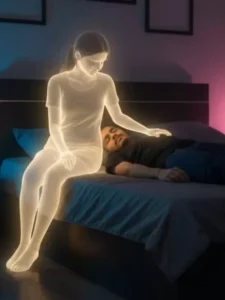
A young Indian man lies on his bed at night, wearing dark night clothes.
The room glows softly with neon blue and pink lights, creating a moody atmosphere.
Beside him stands the glowing spirit of an Indian girl, her body emitting a gentle golden-white aura. She looks at him lovingly, with her hand placed softly on his cheek. A single tear rolls down from the man’s eye as he sleeps, feeling her presence without waking. The room around them is dim and quiet, filled with emotion and nostalgia. keep my face 100% same as in the reference image
2 PROMPT
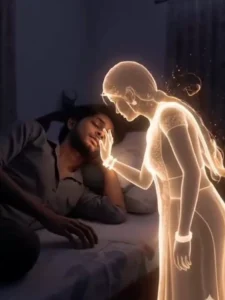
A soft, ethereal scene
where a man is peacefully sleeping in his bed, partially covered by a blanket. Above him, a glowing, translucent female figure with long hair gently touches his forehead with her hand. The room is dimly lit, casting a warm, comforting glow. The overall mood is serene and dreamlike, with a hint of mystery or spiritual presence.” keep my face 100% same as in the reference image
How To Generate Video
Friends, to create a video from an image, we first need to know how to use it, because we can’t create a video without knowledge. Therefore, I’ll explain all the steps in this paragraph. Follow them, and your video will be easily edited. First, click on the “Create Your Video” button. You’ll be taken to the Flow AI website. The first thing you need to do is log in. You’ll see a “Project” option. Open it. In the dashboard below, you’ll see “Text” and “Video” options. Click on “Frame” and “Video.” Here, you’ll find various options. From there, select “Frame” and “Video.” Now, select your image using the “+” icon. We’ll create a drone shot. Then, return to the website, copy the prompt, and use it to edit your image on the Flow Labs website. Click on “Generate” and your video will be ready in a few moments. Save it. In this way you can make a video of your image, it will look absolutely real.
Conclusion
This way, you can create a trending AI girlfriend video, which will be automatically AI-generated. This task will take us about 2 to 3 minutes. Now, I hope you understand how to create your own video. I hope you enjoyed this article. If you want to learn or try more trending editing techniques, keep visiting our website. You’ll find new prompts and templates for trending editing every day.